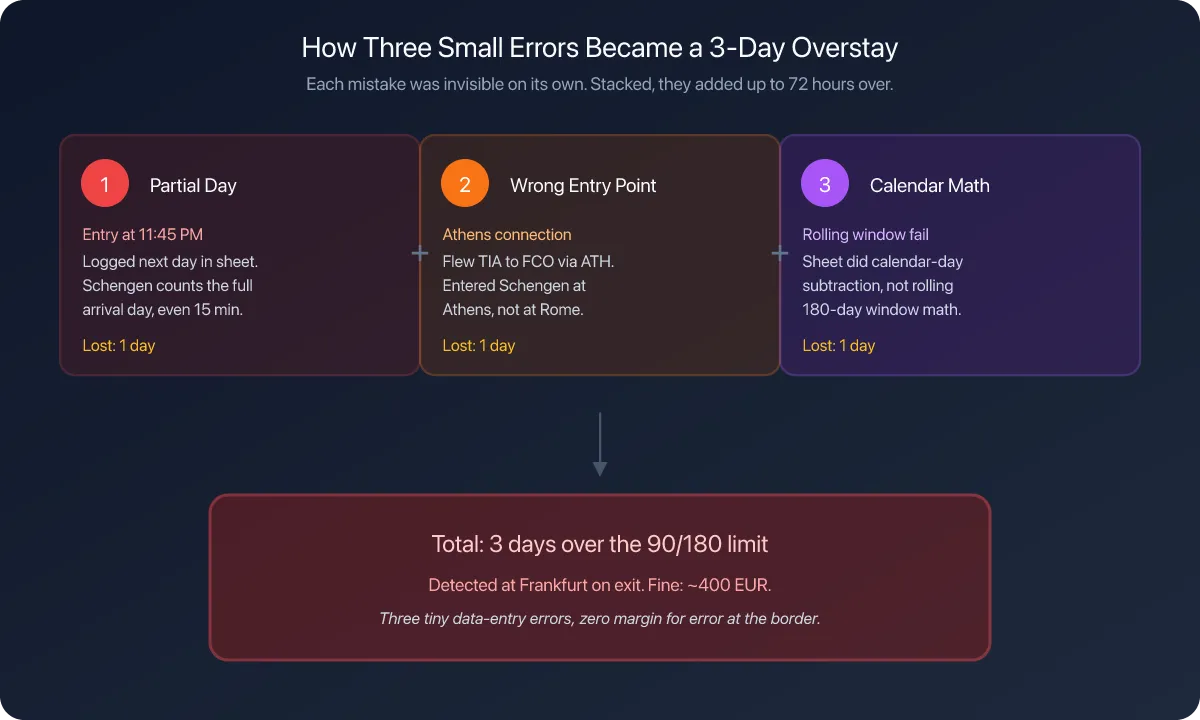
I have a confession. Before I built the Schengen tracker in Nomad Tracker, I was the guy with a color-coded Google Sheet that still managed to get the math wrong. The rolling 180-day window is deceptively simple to describe and surprisingly easy to miscalculate by hand. One wrong date, one forgotten layover, and suddenly you're standing at passport control in Amsterdam wondering if you're about to have a very bad day.
That experience is exactly why Schengen tracking exists in the app. And with the EU's Entry/Exit System (EES) now rolling out across Schengen borders in 2026, accurate day counting has gone from "nice to have" to "non-negotiable." The system registers your biometric data at every border crossing. There's no more ambiguity about when you entered or left. If your count is off, they'll know.
This guide walks you through setting up Schengen tracking in Nomad Tracker from scratch, step by step. Whether you just downloaded the app or you've been using it for months without touching the Schengen settings, you'll be fully configured by the end.
Why You Need Automated Schengen Tracking in 2026
Let's be real about what's changed. Before 2026, border agents relied on flipping through your passport and eyeballing stamps to check your Schengen compliance. Stamps could be smudged, pages could be missed, and honestly, many agents didn't bother counting too carefully at smaller crossings.
That era is ending. The EES, which began its phased rollout in October 2025 and reaches full implementation by April 9, 2026, replaces manual passport stamps with digital records. Facial recognition and fingerprints at the border. Every entry, every exit, logged automatically. The system will calculate your remaining days in real time.
This means two things for nomads. First, overstaying even by a single day will be caught automatically. Second, you need your own tracking to match what their system shows, so you're never surprised at the gate.
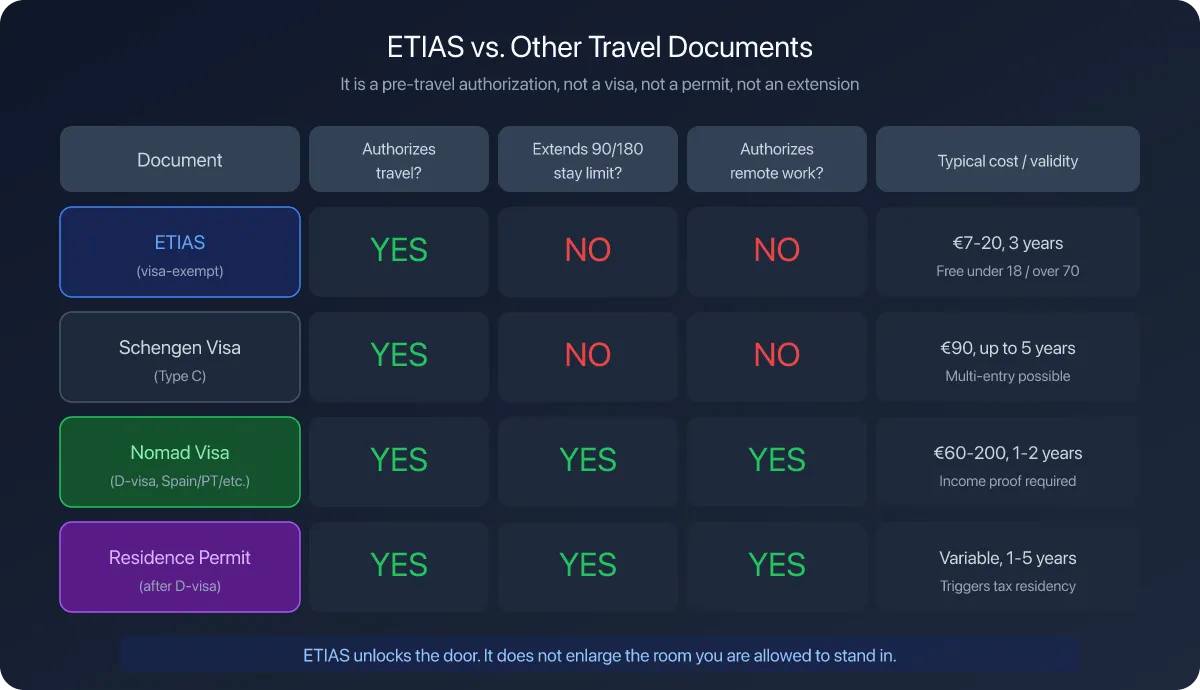
ETIAS, the pre-travel authorization system launching later in 2026, adds another layer. While it doesn't change the 90/180 rule itself, it creates an additional digital paper trail that links to EES data. Our ETIAS and EES update covers both systems in detail. The days of "winging it" with Schengen compliance are over.
Step 1: Log Your Travel History
Before you configure anything, the app needs to know where you've been. Schengen tracking only works if it has accurate data about your past entries and exits.
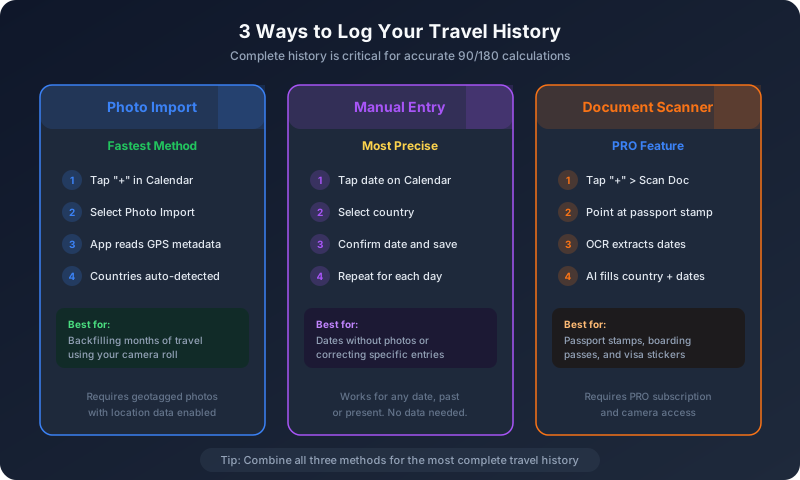
Open Nomad Tracker and head to the Calendar tab. You have three ways to backfill your history:
Option A: Photo import. This is the fastest method if you have geotagged photos on your phone. Tap the "+" button, then select the photo import option. The app reads GPS metadata from your camera roll and automatically detects which countries you were in on which dates. It's surprisingly accurate, and it handles multi-country trips well.
Option B: Manual entry. Tap any date on the calendar and add a log manually. Select the country, confirm the date, and save. This is the best approach for dates where you don't have photos or GPS data.
Option C: Document scanner (PRO). If you have passport stamps or boarding passes, use the OCR scanner from the "+" menu. Point your camera at the document, and the app extracts dates and country information automatically. The AI analysis then fills in the details for you.
The key here is completeness. Every Schengen country day needs to be logged for the rolling window calculation to be accurate. Missing even a few days in, say, a quick weekend in Vienna could throw off your count.
Step 2: Enable Schengen Tracking in Runway Settings
With your history in place, it's time to turn on Schengen monitoring. Go to Settings, then find Runway Configuration.
Here you'll see options for different tracking rules. Look for Schengen Area (listed with the code "SCH" and the EU flag). Toggle it on to add it to your dashboard.
Once enabled, the app creates a virtual "country" rule for the entire Schengen zone. Unlike individual country rules that track days per nation, this one aggregates all your days across all 29 Schengen member states into a single rolling count.
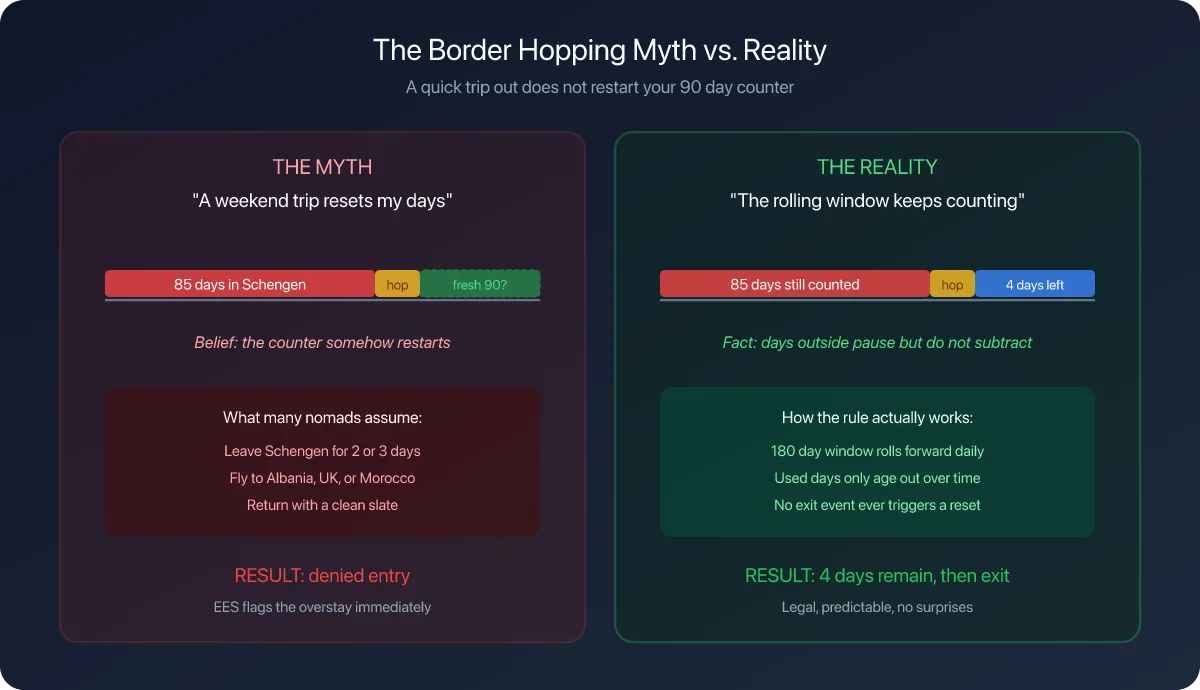
The rule is simple: 90 days maximum within any 180-day rolling window, and our 90/180 guide explains why that window is harder to count by hand than it sounds. The app calculates this automatically using every Schengen-country log in your history.
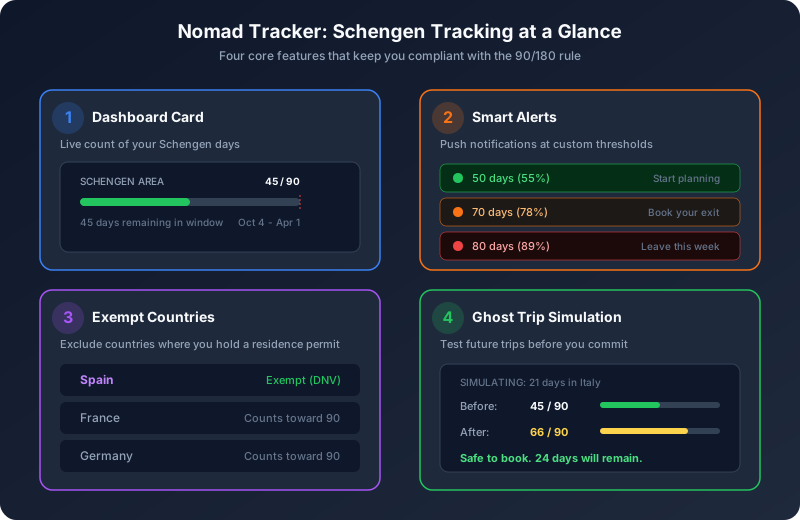
After enabling, go back to your Dashboard. You should now see a Schengen Area card showing your current status. It displays your days used out of 90, a progress bar, and the rolling window dates. Tap the card to open the Schengen Info Sheet, which gives you a detailed breakdown of the calculation.
Step 3: Configure Exempt Countries
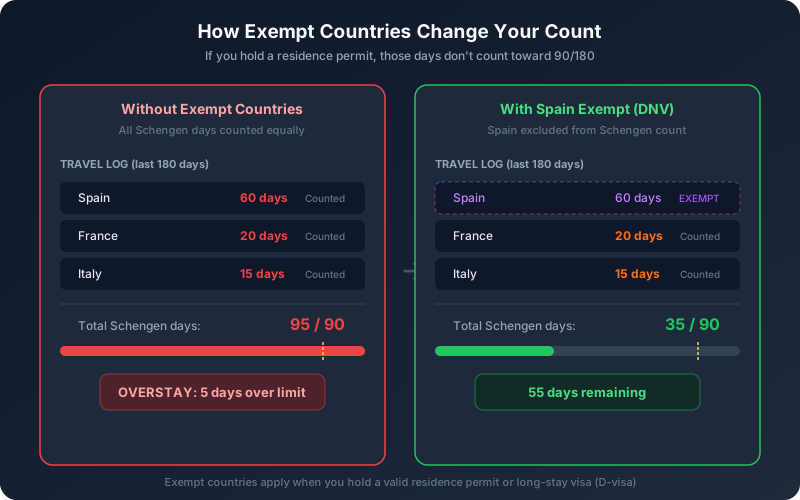
This step is critical if you hold a residence permit in any Schengen country. Here's why: if you have, say, a Spanish digital nomad visa (DNV), the days you spend in Spain don't count toward your Schengen 90/180 limit. Your visa covers those days separately. But days in every other Schengen country still count. If you do not hold a permit yet and are weighing your options, our 2026 digital nomad visa comparison lays out the main European programs.
Navigate to Settings > Schengen Exempt Countries. You'll see a list of all 29 Schengen member states. Tap to select any country where you hold a valid residence permit or long-stay visa (D-visa).
Common scenarios where you'd mark a country as exempt:
- You have a Portuguese D7 or D8 digital nomad visa, so Portugal is exempt
- You hold a Spanish DNV or Beckham Law residency, so Spain is exempt
- You have an Estonian e-Residency with a D-visa (rare, but it happens), so Estonia is exempt
- You hold a German freelancer visa, so Germany is exempt
The app then recalculates your Schengen days, excluding time spent in your exempt country. This is a big deal. Without this setting, nomads with residence permits often see inflated Schengen counts that don't reflect their actual legal exposure.
Step 4: Set Up Schengen Alerts
This is where the app shifts from passive tracking to active protection. Schengen alerts warn you before you hit dangerous thresholds, giving you time to adjust your plans instead of panicking at the border.
Go to Settings > Fiscal Alerts, and find the Schengen Area section. Tap it to open alert configuration.
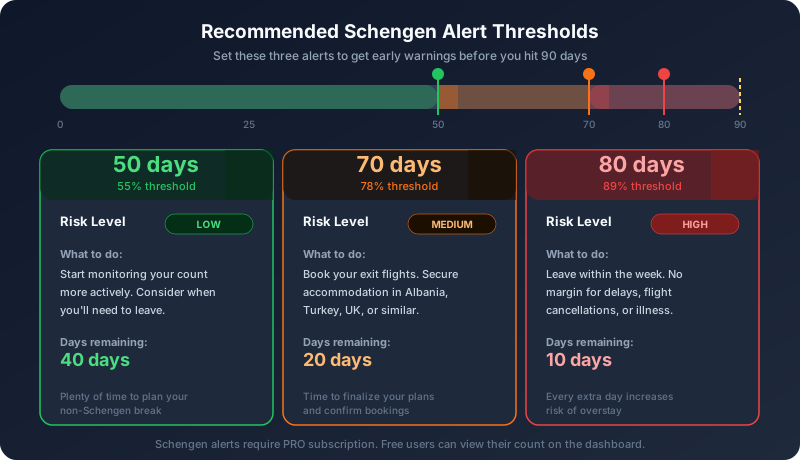
You can add multiple alerts at different percentage thresholds of your 90-day limit. Here's what I recommend setting up:
Alert at 55% (roughly 50 days). This is your "start paying attention" trigger. At this point, you've used just over half your allowance, and it's a good time to start thinking about your exit strategy. Still plenty of time, but the clock is ticking.
Alert at 78% (roughly 70 days). The planning alarm. With 20 days left, you need to have your non-Schengen accommodation sorted. This is when you should be booking flights to Albania, Turkey, the UK, or wherever you'll wait out the window.
Alert at 89% (roughly 80 days). The "get out now" warning. At 10 days remaining, there's almost no margin for error. Flight cancellations, illness, or unexpected delays could push you over. If you're still in the zone at this threshold, leave within the week.
Each alert sends a push notification to your phone, so you'll see it even if you haven't opened the app recently. Just make sure you've granted notification permissions during onboarding or in your device's Settings app.
One thing to note: Schengen alerts are a PRO feature. Free users can see their Schengen day count on the dashboard, but the proactive alert system requires a subscription.
Step 5: Enable Location Tracking for Automatic Logging
Manual entry works, but the real power of Nomad Tracker is automatic detection. When you enable location tracking, the app detects country changes using your phone's GPS and logs them for you. No more forgetting to record a border crossing.
From the Dashboard or Settings, toggle on Location Tracking. The app uses a progressive permission model:
- First, it requests "While Using" location access
- For background detection (so it catches border crossings while the app is closed), it will ask for "Always" access
The "Always" permission is what makes this genuinely useful for Schengen tracking. You don't want to rely on remembering to open the app every time you cross from Germany into the Netherlands on a day trip. With background location enabled, those crossings are detected and logged automatically.
All processing happens on your device. No location data is ever sent to any server. This is a deliberate design choice, because nomads already have enough to worry about without adding data privacy concerns on top.
One important detail: if the app auto-detects a day that you've already manually logged, your manual entry takes priority. Manual edits are always authoritative. The app will never silently overwrite something you've entered by hand.
Reading Your Schengen Dashboard
Once everything is configured, your Dashboard becomes your Schengen command center. Here's what you're looking at:
The Schengen Card shows your current count as a fraction (like "45 / 90") with a color-coded progress bar. Green means you're comfortable, with plenty of days left. Orange kicks in around 80 days, signaling that you're entering the danger zone. Red means you've hit or exceeded 90, and you need to be outside the zone immediately.
Tapping the card opens the Schengen Info Sheet, which provides a detailed explanation of the 90/180 rule and shows your rolling window start and end dates. This is useful for understanding exactly which past days are still "active" in the current window.
The re-entry date appears if you've used all 90 days or are close to it. This tells you the earliest date you can re-enter the Schengen Area without violating the rule. It's calculated by simulating forward until enough old days fall off the back of the 180-day window.
If you hold a residence permit and have configured exempt countries, the card reflects the adjusted count. A nomad with a Spanish DNV who spent 60 days in Spain and 30 days in France would see "30 / 90" on their Schengen card, because the Spanish days don't count.
Using Ghost Trips to Plan Ahead
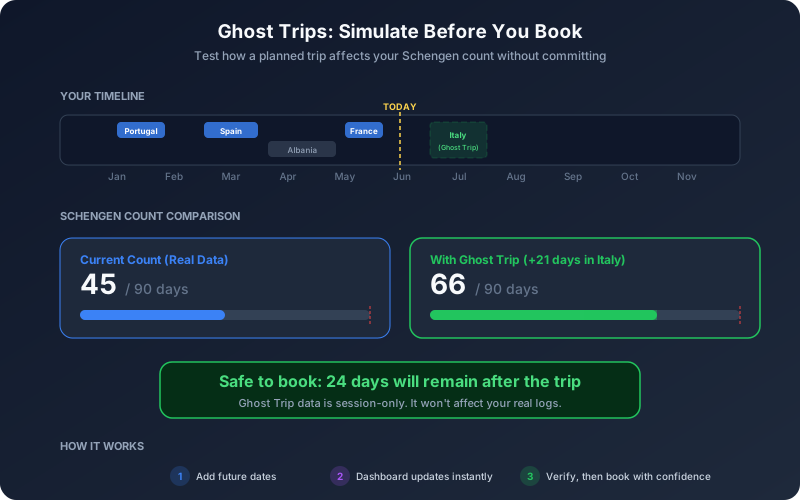
Here's a feature that pairs perfectly with Schengen tracking: Ghost Trips. This lets you simulate future travel without committing to it, so you can see exactly how a planned trip would affect your Schengen count.
Say you're thinking about spending three weeks in Italy next month. Add a Ghost Trip for those dates, and the dashboard instantly updates to show what your Schengen count would be at the end of that trip. If it pushes you over 90, you'll know before you book anything.
Ghost Trips are session-only, meaning they disappear when you close the simulation. They don't mess with your real travel logs. And on the dashboard, real data always has visual priority over ghost data, so there's no confusion about what's actual versus simulated.
This is incredibly useful for the "staggered entries" strategy, where you split your 90 days across multiple shorter trips with non-Schengen breaks in between. Ghost Trips let you map out the entire sequence and verify that every entry and exit keeps you within limits.
Common Setup Mistakes to Avoid
Forgetting transit days. If your layover in Frankfurt took you through passport control, that is an entry, and the day counts as a Schengen day. Staying airside in the international transit area is not an entry. Make sure the layovers where you crossed passport control are logged.
Not updating exempt countries after visa changes. If your Spanish DNV expired and you're now traveling on tourist entries, remove Spain from the exempt list immediately. Otherwise your count will be artificially low.
Ignoring the 2025-2026 transition. The 180-day rolling window looks back from today. If you traveled in late 2025, those days still count in early 2026. Make sure your history goes back at least 180 days from your first Schengen entry.
Disabling location permissions. If you downgrade from "Always" to "While Using" or turn off location entirely, the app can't detect border crossings in the background. You'll need to log those manually, which defeats the purpose.
The Bottom Line
Setting up Schengen tracking takes about five minutes. Logging your history is the longest part, especially if you're backfilling several months of travel. But once it's configured, the system runs quietly in the background, updating your count with every border crossing and alerting you before you get anywhere near the limit.
With EES now digitally recording every entry and exit at Schengen borders, there is zero margin for error on compliance. The border agent's screen will show exactly how many days you've spent in the zone. Having the same number on your phone, updated in real time, is the simplest way to make sure those numbers always match.
Track your Schengen days automatically.
Nomad Tracker monitors your 90/180 rolling window in real time, sends alerts before you hit limits, and runs entirely on your device. No spreadsheets, no guesswork.
Download on the App Store