For decades the passport stamp was the default record of where a traveler had been. A border guard pressed ink onto paper, and that smudge was the closest thing most people had to an official travel log. Nomads would flip through their pages before a trip to reconstruct a Schengen count, or photograph them for an accountant at tax time.
That habit is breaking down from two directions at once. Stamps are hard to read, by people and by software. And in 2026 the biggest stamping system in the world, the Schengen Area, stopped stamping third-country nationals altogether.
This article explains how Nomad Tracker's document scanner and Proof Classifier read stamps and other travel paperwork, what happens to the text it extracts, where stamps fail as evidence, and what to collect instead now that the ink is disappearing.
What a Schengen stamp actually encodes
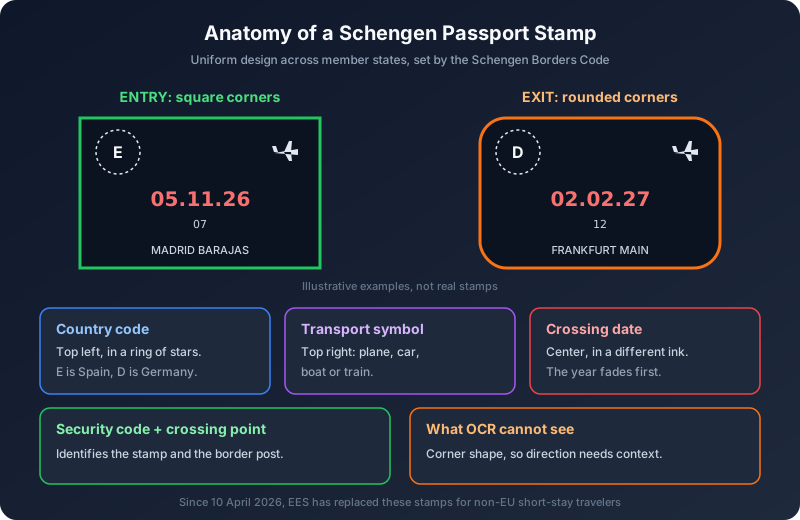
Before talking about software, it helps to know what a stamp is supposed to tell you. Schengen stamps follow a uniform design across member states, set out in the Schengen Borders Code (Regulation (EU) 2016/399) and its annexes:
- Shape: entry stamps have square corners, exit stamps have rounded corners. This is the single fastest way to tell an arrival from a departure.
- Country code: the issuing state's code sits inside a ring of stars in the top left corner, for example "E" for Spain or "D" for Germany.
- Mode of transport: a small symbol in the top right shows how you crossed: plane, car, boat or train.
- Date: the date of the crossing, traditionally printed in a different color from the rest of the stamp.
- Security code and crossing point: a short code identifying the specific stamp and, at the bottom, the name of the border crossing point.
The legal purpose was narrow. The Borders Code describes the stamp as a way to establish the date and place of a border crossing with certainty. It was never meant to prove anything else.
Why reading a stamp is harder than it looks
On a clean, freshly stamped page, a human can read all of that in two seconds. In real passports, things go wrong:
- Faded or uneven ink. A dry stamp pad produces half a date. The year is often the first digits to vanish.
- Overlap. Busy pages end up with stamps printed on top of other stamps, visas and page artwork.
- Rotation. Guards stamp wherever there is room, at any angle.
- Ambiguous date formats. "03.04.26" is 3 April in most of Europe and 4 March if you read it the US way. Different countries print dates differently, and some stamps outside Schengen are partly handwritten.
- Entry versus exit. Software reading only text cannot see that a stamp has rounded corners. The direction of travel often has to come from context.
None of this is exotic. It is the normal state of a well-used nomad passport, and it is exactly why any tool that reads stamps needs a human check before it writes anything.
How Nomad Tracker reads a document, step by step
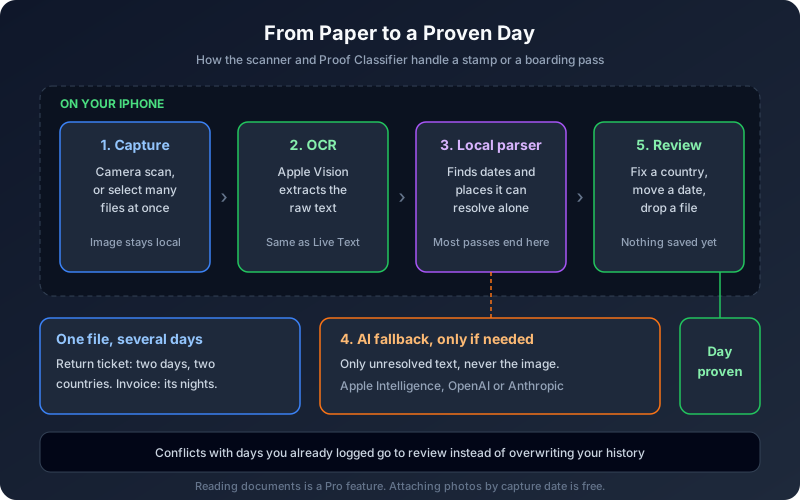
Nomad Tracker has two ways in. The one-shot scanner handles a single document: you scan it with the camera and it lands on its day with the country and dates filled in. The Proof Classifier handles volume: you select as many boarding passes, hotel invoices, entry stamps, receipts or screenshots as you like and it processes them as a batch. Both are reached from the Calendar tab, and reading documents is part of Pro.
Under the hood the flow is the same.
1. Text is extracted on your iPhone
The image never leaves the device to be read. Text is extracted on-device with Apple's Vision OCR, the same framework iOS uses for Live Text. That step turns a photo of a stamp or a boarding pass into raw characters: a country code, a date string, a flight number, a hotel name.
2. A local date parser tries first
The extracted text goes to a local parser that looks for dates and places it can resolve on its own. A boarding pass with a clear date and airport codes is usually settled at this stage, without anything going anywhere.
3. AI only sees what the parser cannot resolve
When the local parser cannot work out a date or a country, and only then, the extracted text (not the image) goes to the AI provider you chose in settings. That can be Apple Intelligence running on-device, in which case nothing leaves the phone at all, or OpenAI or Anthropic if you prefer. We designed it this way on purpose: travel documents are some of the most sensitive files on your phone, and the default path should be the private one.
4. One document can produce several days
The classifier does not assume one file equals one day. A return ticket becomes two entries, a departure and a return, often in two different countries. A hotel invoice attaches to the first night and shows the nights it covers. Days you never logged are created, and duplicates are detected.
5. Nothing is written until you review it
Every batch ends on the Review screen. Each row shows the document's thumbnail, the country, the file name and a pill with the day the proof anchors to. Anything that contradicts what you have already logged goes here for you to decide, instead of silently overwriting your history. You can change a country, move a date, or swipe a row away before tapping attach.
Photos versus documents: two different jobs
People often confuse two features that sit on the same sheet.
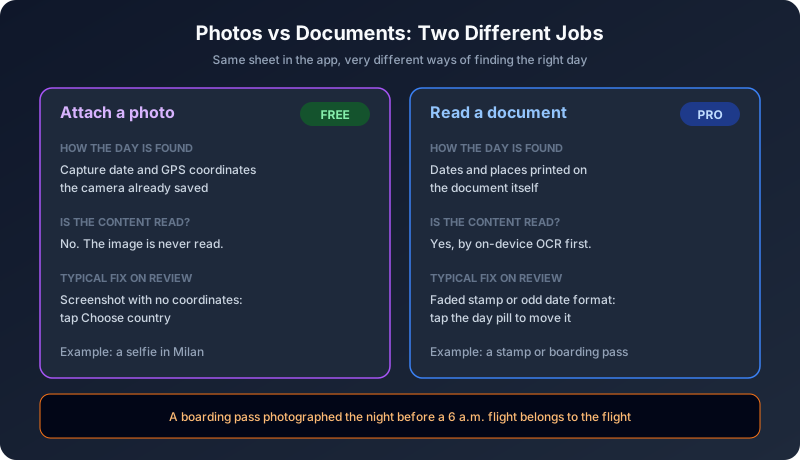
Attaching a photo is free. The app does not read the photo at all. It attaches it to the day it was taken using the capture date and coordinates the camera already stored in the file. A selfie in front of the Duomo proves Milan on the day the camera says, and no OCR is involved.
Reading a document is the Pro part. A stamp, a boarding pass or an invoice is usually photographed or screenshotted on a different day, sometimes in a different country, from the date it is about. A boarding pass photographed the night before a 6 a.m. flight belongs to the flight, not to the photograph. That is why documents need their contents read, and why photos do not.
The distinction also explains the most common correction on the Review screen. A screenshot carries no coordinates, so its row shows "Choose country" until you pick one. That is normal, not a bug.
Stamps are disappearing, and that changes the job
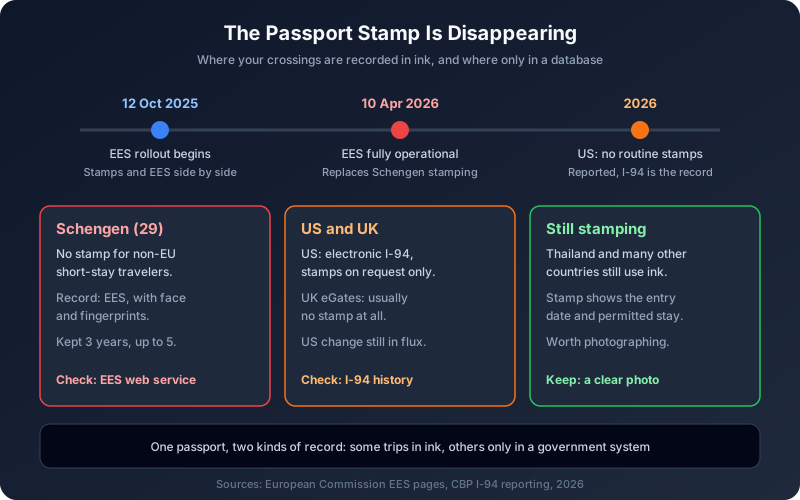
Here is the part that makes this feature more relevant in 2026 than it would have been five years ago: the stamps themselves are going away.
Schengen: EES replaced stamping
The EU's Entry/Exit System began a progressive rollout on 12 October 2025 and, according to the European Commission, became fully operational on 10 April 2026. For non-EU nationals on short stays, EES replaces passport stamping. Border systems now record your name, travel document data, fingerprints and facial image, along with the date and place of each entry and exit. The data is kept for three years in most cases, and up to five in some.
There is an official web service where travelers can check how much of their authorized stay remains. But there is no longer a stamp in your passport that you can photograph and keep.
United States: the I-94 is the record
The US has relied on the electronic I-94 for years, and in 2026 multiple reports indicated that CBP no longer routinely stamps passports at entry, with stamps available only on request in limited cases. The I-94 website and app are where your admission history lives. This change is recent and the details are still being reported, so treat it as in flux and check the CBP I-94 site after each trip.
UK and elsewhere
Travelers using UK eGates generally pass without receiving a stamp. Meanwhile, plenty of countries still stamp: Thailand is the classic example, where entry stamps and permitted stay dates remain central to visa-exempt and visa-based stays. Many nomads now carry a passport where some trips are documented in ink and others only in a government database they cannot easily access.
Why your own evidence matters more, not less
It is tempting to conclude that if governments track everything digitally, you no longer need to keep anything. The opposite is true, for two reasons.
The border database is not your database
EES records exist for the authorities. You can query remaining days through the official service, but you do not get a downloadable travel log you can hand to a tax adviser, a residency office or an immigration lawyer. If a record is wrong, for example a missing exit after a chaotic airport day, the burden of showing otherwise falls on you.
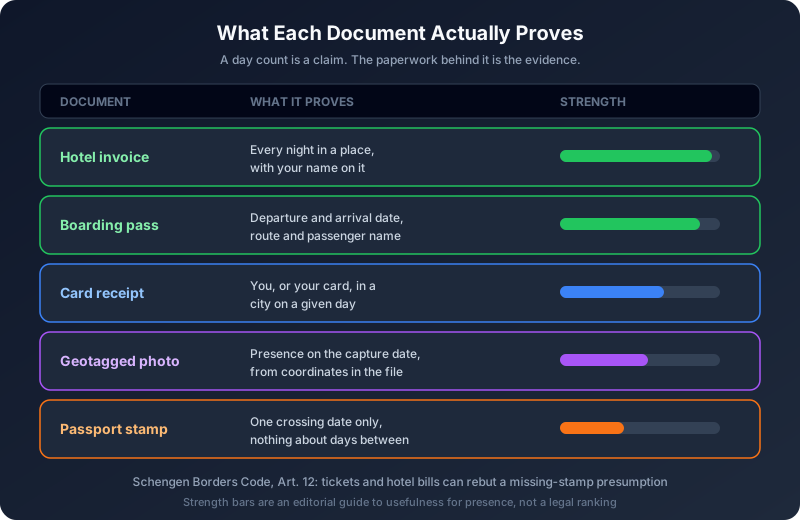
The Schengen Borders Code already anticipated this kind of dispute. Under Article 12, if a third-country national has no entry stamp, authorities may presume they do not meet the conditions on duration of stay. That presumption can be rebutted with credible evidence, and the Commission has given transport tickets and hotel bills as examples. The logic carries over to a digital world: when the official record and reality disagree, tickets and invoices are what settle it.
Tax offices ask for documents, not numbers
Immigration counts are only half the picture. A tax authority examining whether you crossed 183 days in Spain, or a US filer defending a Physical Presence Test claim, will want to see where you were on specific dates. A day count in an app is a claim. The boarding pass behind it is the evidence. Passport stamps were never a good answer here anyway: they show crossings, not presence, and they say nothing about the days in between.
A practical workflow for documenting your days
Based on how Nomad Tracker users actually build their records, a routine that holds up looks like this:
- Save boarding passes the day you fly. Screenshots of mobile boarding passes are fine. They carry the date, the route and your name, which is exactly what both border and tax disputes come down to.
- Keep every accommodation invoice. Ask for one even on short stays. An invoice covering a range of nights is the strongest single document for presence in a country.
- Photograph stamps when you still get them. A Thai entry stamp or a stamp from a non-Schengen Balkan border is still worth capturing. Photograph the page flat and in good light, since that is the single biggest factor in whether OCR reads the date correctly.
- Batch, then review. Drop the week's documents into the Proof Classifier, then spend a minute on the Review screen. Check rows marked "Choose country" and any pill whose date looks off by one, which usually means a late-night capture near a time zone change.
- Check the official records separately. Use the EES web service before a Schengen exit you are unsure about, and pull your I-94 history after US trips. If they disagree with your own log, you will want to know before an officer does.
- Export when someone asks. The attached files appear as an appendix inside the exported PDF report, so an adviser sees the count and the documents behind it together.
What the scanner will not do for you
A clear scope keeps expectations honest. The scanner reads dates and countries out of documents and anchors them to days. It does not tell you whether a given stamp was applied correctly, it cannot verify that an EES record matches your passport, and it does not give legal advice. Faded or partly illegible stamps may still need a manual correction. That is the reason the Review screen exists: approving evidence against a file name is a rubber stamp, and approving it against the document itself is a check.
The bottom line
The passport stamp had a long run as the nomad's informal travel log, but it was always a weak one: easy to smudge, hard to read, and silent about the days between crossings. With EES live across Schengen and other countries moving to electronic records, the ink is going away entirely for many trips.
What replaces it, for your own purposes, is a personal record built from the documents you already generate: boarding passes, invoices, the stamps you still receive and the photos you already take. The document scanner and Proof Classifier exist to turn that pile into dated, country-tagged evidence attached to each day, read on your device and reviewed by you before anything is saved.
Turn your travel paperwork into proof.
Nomad Tracker reads boarding passes, invoices and passport stamps on-device, attaches each one to the day it proves, and counts Schengen 90/180 and the 183-day rule alongside GPS day tracking and Ghost Trips. All private, no account needed. Available on iOS.
Download on the App Store