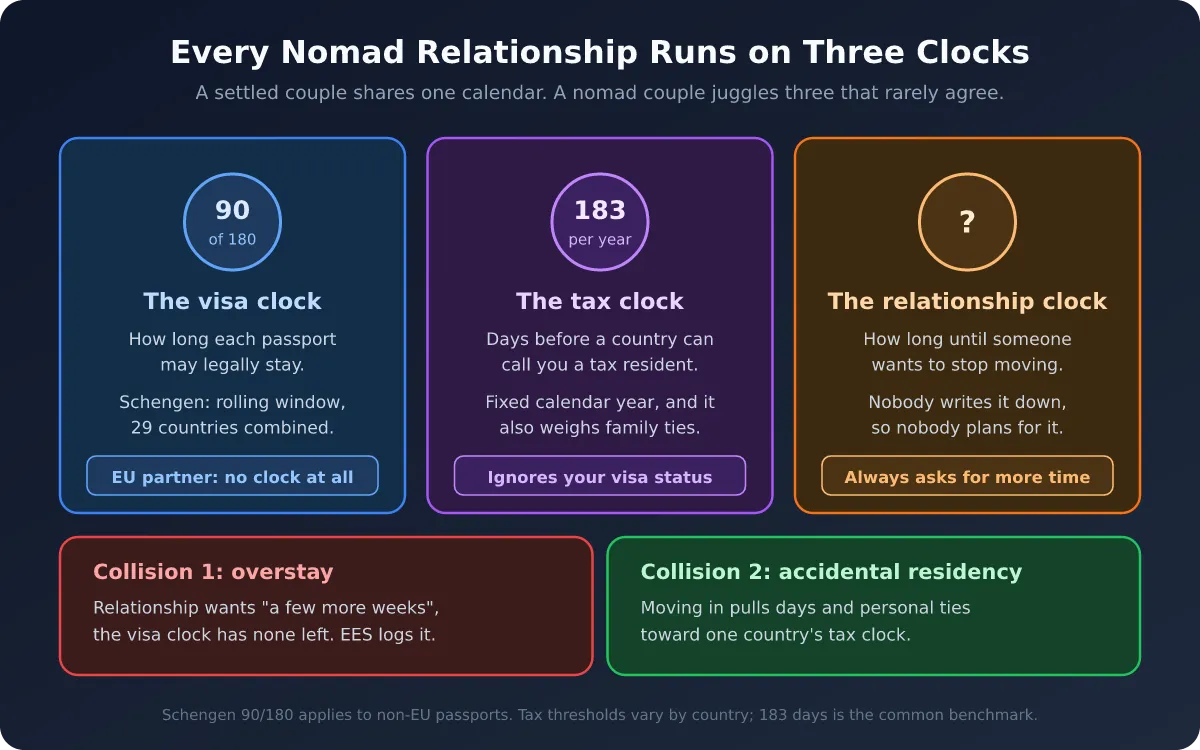
Most visa trouble is decided weeks before anyone reaches a border. It happens the evening you book a non-refundable apartment for February, when the only check you ran was "I have days left, right?" The answer to that question changes depending on which day you ask it, which country you are in, and which clock you are thinking about.
Ghost Trips exist to move that check to the right moment: before the booking. A ghost trip is a stay you have not taken, added to Nomad Tracker as a simulation on top of your real history. Every counter it touches shows the planned days separately from the lived ones, and nothing in your logged record changes.
This guide walks through planning a full six months with it, using one worked example from start to finish. The example is hypothetical, but the arithmetic is real and every number in it was calculated, not estimated.
Why Six Months Is the Right Planning Horizon
Six months is roughly the length of the Schengen lookback (180 days), roughly half a tax year, and about as far ahead as most nomads have firm plans.
It also matters more in 2026. The EU's Entry/Exit System has been fully operational at every external Schengen border since 10 April 2026. Entries and exits are now recorded biometrically instead of with ink stamps, and the stated goal of the system is to detect overstays systematically. The days you spent in Portugal in September are on record, and they will be counted in February whether or not you remember them.
ETIAS, the travel authorization that was supposed to follow, is still not live. The EU dropped its last quarter of 2026 target in July and the official site now says the system is not in operation, with most reporting pointing to 2027. That changes nothing about the 90/180 math. It only means one less form for now.
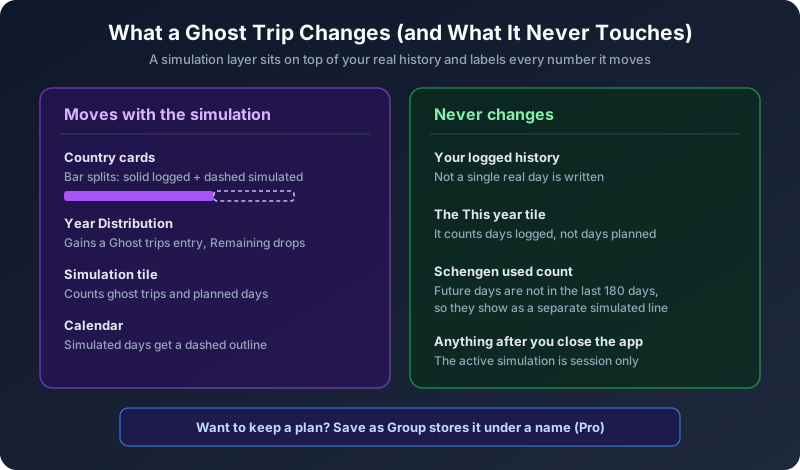
What a Ghost Trip Actually Changes
Before building anything, it helps to know exactly what the simulation touches, because the app is deliberate about keeping planned and lived days apart.
When you add a ghost trip:
- Country cards grow by the simulated days, and the bar splits into a solid part (logged) and a dashed part labeled with the number of simulated days.
- Year Distribution gains a "Ghost trips" entry, and Remaining drops by the days that fall inside the year on screen.
- A Simulation tile appears at the front of the widget strip, counting your ghost trips and total planned days.
- The calendar shows the simulated days with a dashed outline, in a different color from your logged days.
And what does not move:
- Your logged history. A simulation never writes a single real day.
- The "This year" tile, which counts days logged.
- The Schengen "used" number. This is the one that surprises people. Your used count measures the 180 days behind you. A June trip is not behind you in May, so it does not enter that number. It shows up as a separate "simulated" line and in an "Ahead of you" list instead.
The active simulation also disappears when you close the app. That is intentional: a scenario you were toying with should not quietly become part of your record. If you want to keep a plan, Save as Group stores it under a name you can reload later (a Pro feature; building, reading and clearing simulations is free).
The Worked Example: Maria's November to April
Imagine Maria, a US citizen working remotely, writing her plan on 22 October 2026. Her logged history so far:
- Portugal, 1 September to 16 October 2026: 46 Schengen days.
- Morocco, since 17 October 2026: where she is now.
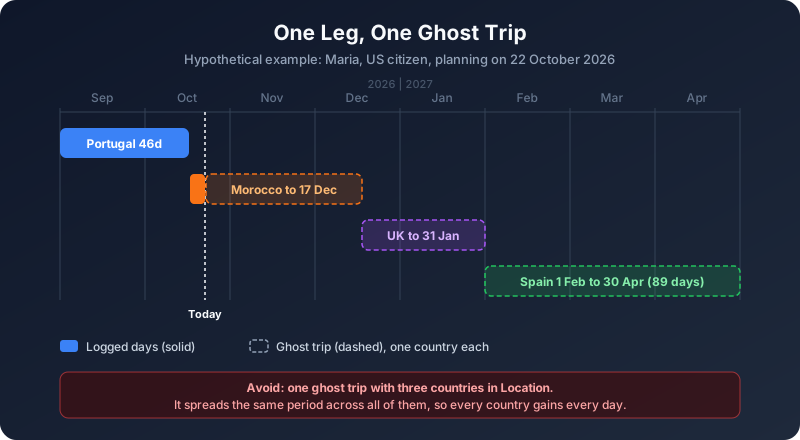
She wants to spend the late winter and spring in Spain, ideally about two and a half months. Between now and then she has two months to fill outside Schengen. Her draft itinerary has three legs:
- Morocco until mid-December. US citizens can stay visa-free for up to 90 days per entry.
- United Kingdom over Christmas and January, visiting family.
- Spain for the long stay.
One leg, one ghost trip
The single most common mistake when simulating an itinerary is putting several countries into one ghost trip. A ghost trip with two countries in its Location list spreads the same period across all of them, so every country gains every day. That is useful for nothing except double counting.
Build the plan as three separate ghost trips instead: Calendar tab, Add, Add Ghost Trip, tap the first and last day of the leg, set one country under Location, and tap Add. Repeat for each leg. When you add the second leg, the first one is already visible in the sheet as dashed rows, which makes it easy to check that legs meet without overlapping.
If two legs share a day (you fly out of Marrakech and land in London on the same date), the app lets you do it and both countries count that day. That is actually how many rules treat travel days, but decide on purpose rather than by accident.
Step 1: Test the Schengen Leg First
Start with the leg that has the hardest limit. For Maria, that is Spain.
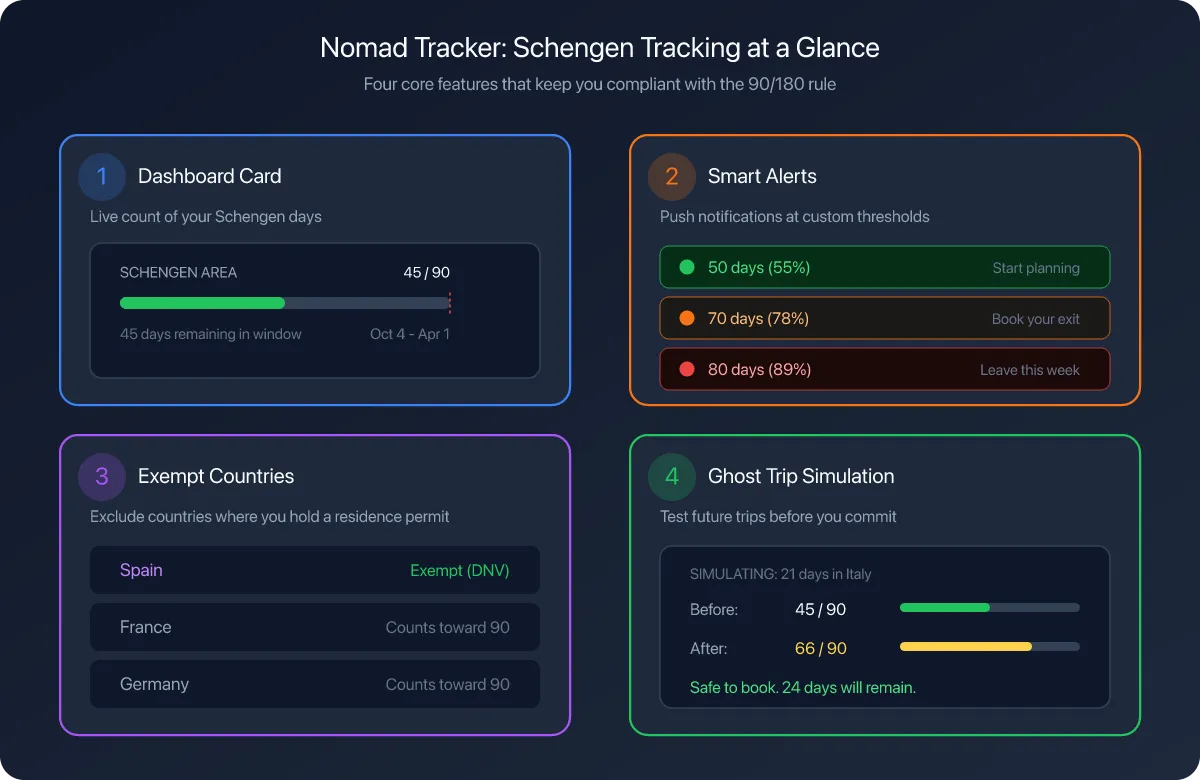
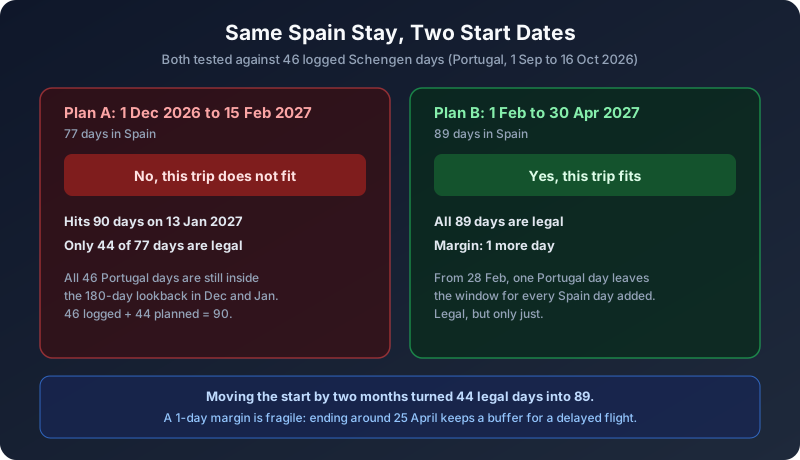
Her first instinct is to go early: Spain from 1 December 2026 to 15 February 2027, 77 days. On its own, 77 is comfortably under 90. Add it as a ghost trip and the Schengen verdict banner in the Add Ghost Trip sheet answers immediately:
No, this trip does not fit. She hits 90 days on 13 January 2027, and only 44 of the 77 days are legal.
The reason is the 46 Portugal days. On any date in December or January, the 180-day lookback still reaches back into September, so all 46 of those days are still in the count. 46 plus 44 is 90. Portugal days only start dropping out of the window on 28 February 2027, which is 180 days after 1 September.
This is exactly the trap the rolling 180-day window sets for people who think of the rule as "90 days per trip" or "90 days, then a reset." There is no reset. There is only the window, and it remembers.
Move the dates, not the destination
A ghost trip cannot be edited in place, so changing dates means swiping the trip away in the Ghost Trips sheet and adding the new version. It takes about as long as editing would.
Maria tries the same city, starting two months later: Spain from 1 February to 30 April 2027, 89 days. The verdict flips:
Yes, this trip fits. All 89 days are legal, and the trip could run 1 day longer before it breaks the rule.
A longer stay became legal by starting later, because by the time she would normally run out, the Portugal days are rolling off the back of the window one per day, at the same rate new Spain days are added. That second sentence of the verdict is the one to read carefully, though. A one-day margin means one delayed flight or one extra night stands between her and an overstay. A realistic plan would end a few days earlier, around 25 April, and keep the buffer.
If you have Pro, the Plan ahead grid on the Schengen screen answers the inverse question for every date at once: how long a stay starting that day could run.
Step 2: Check the Clocks That Are Not Schengen
A Schengen verdict of "fits" is necessary, not sufficient. Every country in the itinerary runs its own clocks, and some of them have nothing to do with immigration.
Per-entry limits outside Schengen
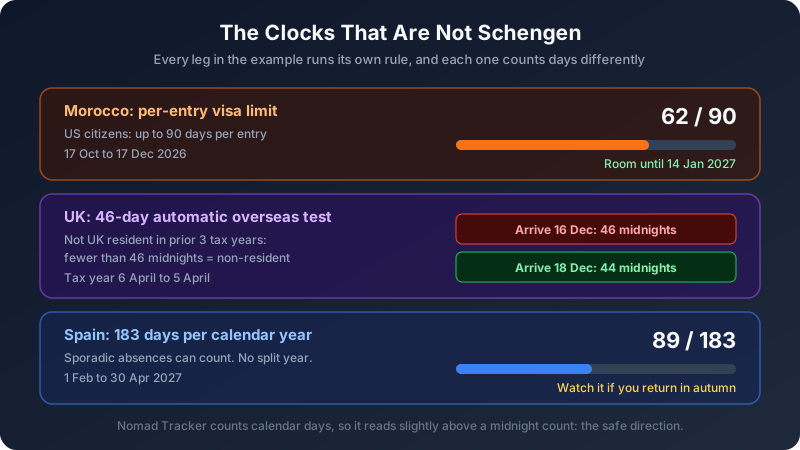
Morocco gives US citizens up to 90 days per entry. Maria's stay there runs from 17 October to 17 December, which is 62 days. If her Morocco leg slipped into January because a flight changed, she would still be fine, but only up to 14 January. Setting a 90-day visa limit for Morocco in Countries & Regions means the Morocco card shows exactly how much of the entry the ghost trip uses.
Tax thresholds that count differently
The UK leg is the interesting one. Visitors from the US can stay up to six months, so immigration is not the issue. Tax is.
Under the UK's Statutory Residence Test, someone who was not UK resident in any of the previous three tax years is automatically non-resident if they spend fewer than 46 days in the UK in the tax year (6 April to 5 April). A day generally counts if you are in the UK at midnight. Above that line you are not automatically resident, but you lose the clean answer and fall into the sufficient ties test, which looks at family, accommodation, work and prior presence.
Maria's first draft had her landing in London on 16 December and leaving on 31 January. That is 46 UK midnights: exactly one too many for the automatic test. Shifting her arrival to 18 December (two more days in Morocco) brings it to 44 midnights and keeps her inside the safe harbor with a small buffer.
Nomad Tracker counts calendar days, including arrival and departure days, so its number will read slightly higher than a midnight count. That makes it conservative, which is the direction you want an error to go. Set a custom threshold for the UK in Countries & Regions (45 days, for example) and the card warns you before you reach the line instead of after.
The 183-day rule in the destination
Spain applies the 183-day test per calendar year, and sporadic absences can be counted toward your Spanish days unless you can prove tax residence elsewhere. Maria's plan puts 89 days in Spain in 2027, so the stay itself is not close. The risk is what she does in the autumn. If she returns to Spain from September, the Spain card will already carry 89 days for 2027, and the 183-day rule in Spain has no split-year relief: you are resident for the whole year or not at all.
This is where a simulation that spans the year boundary earns its keep. Year Distribution only counts the part of a ghost trip that falls inside the year on screen, so switch the dashboard to 2027 to read the Spain total for the year it actually lands in.
Step 3: Compare Versions, Then Save the Winner
Planning is mostly comparison. You rarely ask "does this plan work?" You ask "is the February version better than the January version?"
The workflow that works best:
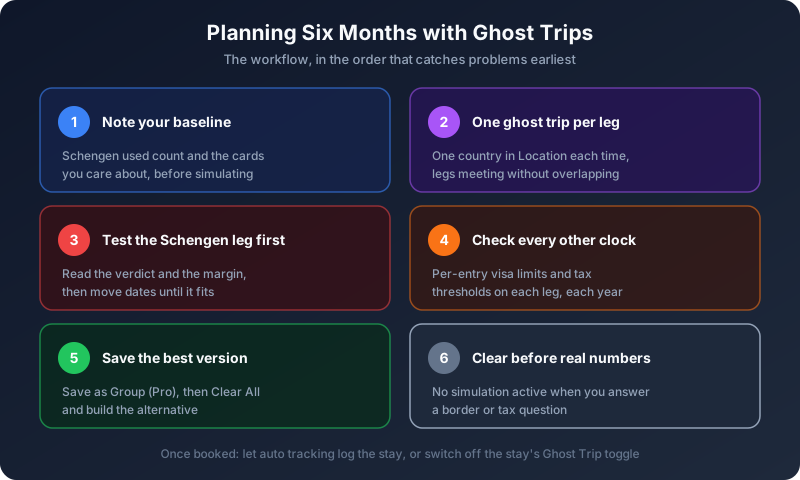
- Write down your starting numbers. Before simulating anything, note the Schengen used count and the totals on the cards you care about. Every version has to be read against that baseline.
- Build version A and read the cards. Schengen verdict, per-entry limits, tax thresholds.
- Save it as a group (Pro) if it is a contender. Groups are named automatically from up to three country flags and the month of the earliest trip, so two plans for the same month will have similar names; the day and trip counts tell them apart.
- Clear All and build version B. Clearing touches only the active simulation. Saved groups stay.
- Load the one you choose. Loading a group replaces the active simulation rather than merging with it, so save anything you are still working on before you load another.
Clear before you read your real numbers
When you are done planning, clear the simulation. Every number the app shows while a ghost trip is active carries the plan inside it, clearly labeled, but still there. Before you answer a border officer's question, fill in a tax form, or tell your accountant how many days you spent somewhere, look at the counters with nothing simulated. The chip with the plane icon in the top left of the Calendar tab tells you at a glance whether anything is active.
When the plan becomes real
Once you book, you have two options. Let automatic tracking log the stay as it happens and delete the ghost trip, or open the stay and switch off its Ghost Trip toggle so it becomes a real entry. Either way, revisit the plan once you are a few weeks in. A trip that fit in October can stop fitting in February if real days landed somewhere you did not plan, like an unexpected long weekend in Paris.
Common Mistakes When Simulating a Trip
Simulating over days you already logged. Real days always take priority over simulated ones, so a ghost trip laid on top of logged days shows in the calendar but tells you very little. Simulate into empty days.
Forgetting the trip spans two years. A ghost trip from November to February splits across two fiscal years. If the dashboard seems to ignore part of it, you are looking at the wrong year.
Treating "fits" as "safe." A one-day margin is technically legal and practically fragile. Leave room for a cancelled flight.
Testing only the destination. The country you transit through, or spend Christmas in, can have the tighter rule. In the example, the UK tax test was a closer call than Spain's immigration limit.
Assuming the window resets when you leave. It never does. If you want the full mechanics of why short exits do not help, our piece on the Schengen border hopping myth walks through it.
The Point of Simulating
None of this replaces professional advice on residency, and the app is explicit that it measures days, not legal status. Tax residency also depends on ties, intent and treaties. What a simulation does is remove the arithmetic from the list of things that can go wrong. The rolling window, the per-entry limit, the midnight count and the calendar year all run on different rules, and checking a plan against four rules in your head is exactly where small mistakes get through.
In the example, two of Maria's first drafts would have failed: one by breaking the Schengen limit by 33 days, the other by putting her one day past a tax safe harbor. Both were fixed by moving dates, and both were found in minutes, before anything was booked.
See the plan before you book it.
Nomad Tracker's Ghost Trips simulate future stays against your real history, with a Schengen verdict, per-country visa limits and fiscal thresholds, all on-device and all private. Available on iOS.
Download on the App Store