What you’ll achieve
By the end of this guide you have sent a support request that can be answered on the first reply, instead of starting a conversation that takes four messages to get to the point.
There are two ways out of the app, and they go to different places. Picking the right one is half the job.
Step 1: Find the Support section
Go to the Settings tab and scroll past Resources.
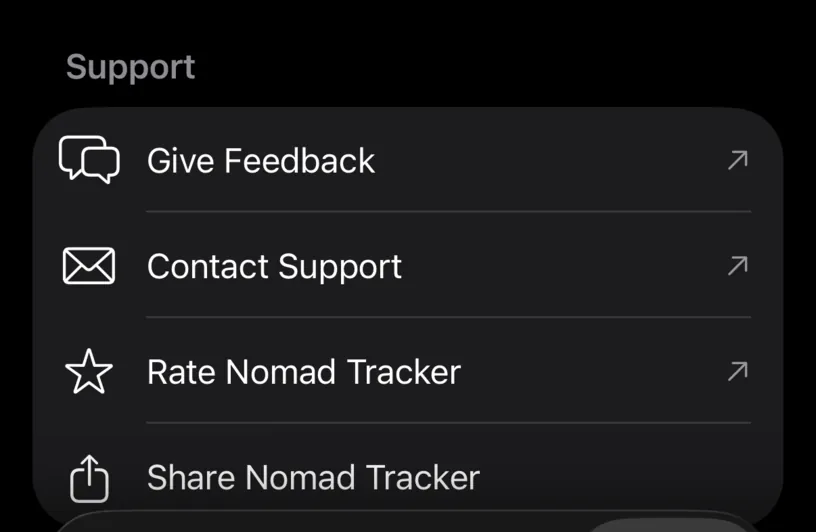
Give Feedback opens a public board in the browser. That is the place for a feature you wish existed, a country rule you would like supported, or a vote on something somebody else already asked for. Other users can see it, which is the point.
Contact Support opens an email to the developer. That is the place for something broken, something wrong, or anything involving your own data.
Both rows carry the small arrow that means you are leaving the app.
Step 2: Write down what happened, in order
The difference between a fast answer and a slow one is whether the message contains a sequence. Three lines is usually enough:
- what you did: the screen, the button, the dates and the country,
- what you expected: the number you thought you would see,
- what you got instead: the number that is actually on screen.
"Thailand says 59 of 180 but I logged 61 days in April and May" is a report someone can act on. "The counting is wrong" is not.
If a number is wrong, say which screen you read it on. The dashboard card, the country detail and the monthly report all count slightly different questions, and naming the screen removes a guess.
Step 3: Add the few facts that are not obvious
Nomad Tracker does not print its version number on any screen, so include what you can:
- your iPhone model and iOS version,
- roughly when you last updated the app from the App Store,
- whether the feature you are asking about is one of the PRO ones.
That last one is quick to check. The top of Settings says it.
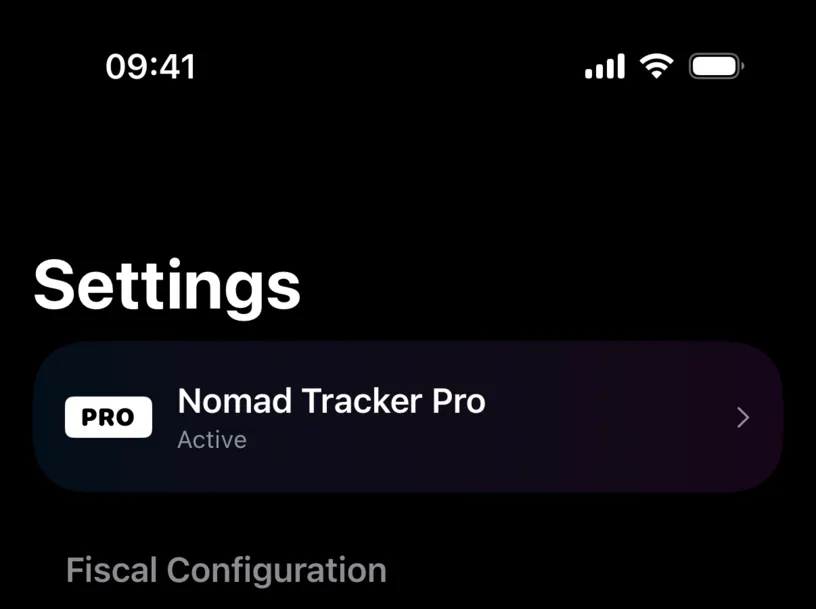
Nomad Tracker Pro with Active underneath means the subscription is running. If the row instead invites you to unlock PRO, say so, because half of "this feature does nothing" reports turn out to be a locked feature behaving correctly.
Step 4: Do not send your travel history
You will not be asked for it, and you should not offer it.
Your days, countries and documents stay on your iPhone and in your own iCloud. The developer cannot see them, which is deliberate, and it also means a support reply is built from your description rather than from your data.
A screenshot of the screen that is wrong is fine, and far more useful than an export. Cover anything in it you would not want read.
Check your result
Before sending, read the message back and ask whether a stranger could reproduce it. If they could open the app, follow your steps and land on the same wrong number, it is ready.
If the answer is no, the missing piece is almost always a date or a country name.
If something looks different
Tapping Contact Support does nothing. The row opens a new email, so it needs a mail account set up on the iPhone. If you do not use Mail, write to the same address from whatever you do use.
You are not sure which one to tap. If it is broken, use Contact Support. If it is missing, use Give Feedback. A feature request emailed privately gets no votes, and a bug posted publicly gets no answer faster.
You wanted to leave a review. Rate Nomad Tracker is the row underneath, and it opens the App Store rather than a support channel.
It is about a charge or a subscription. Purchases go through Apple, so refunds and cancellations are handled in your Apple Account, not by the app.
Next steps
Troubleshoot missing automatic entries and Fix missing notifications cover the two problems most often reported, and both are usually fixable without writing to anyone.