Almost every nomad who takes day counting seriously starts with a spreadsheet. It is free, it is flexible, and for the first few months it works. One row per date, one column for the country, a COUNTIF at the bottom. Done.
The trouble is that a spreadsheet counts dates, while the rules you are trying to satisfy count days, and no two authorities define a day the same way. Schengen, the UK, the US, the IRS foreign earned income exclusion and the Spanish tax agency each have their own answer to "were you here on Tuesday?". A sheet with one row per date can only hold one answer.
This is not an argument that spreadsheets are useless. Plenty of people should keep using one, and we will tell you who at the end. It is a map of exactly where manual tracking breaks, so you can decide whether those failure points apply to your travel pattern. We built Nomad Tracker to remove these failure points, so we have opinions, but the rules below come from the regulations, not from us.
One Calendar Date, Five Different Rules
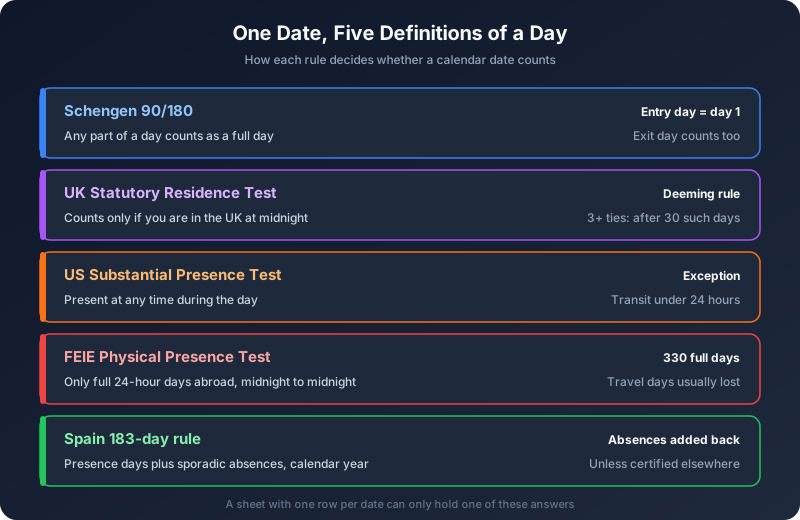
Before any formula, there is a definitions problem. Here is how five of the most common tests count a single day:
- Schengen 90/180: any part of a day counts as a full day. The day you enter and the day you leave are both days of stay, whatever time you crossed the border. The Swiss migration authority's official calculator spells it out: the day of entry is day one and the day of departure is the last.
- UK Statutory Residence Test: the opposite logic. A day counts only if you are in the UK at midnight. Arrive in the morning, leave in the evening, and that day does not count. There is a catch, the deeming rule: if you were UK resident in one of the previous three tax years, have at least three UK ties, and spend more than 30 days in the UK without being there at midnight, every such day after the 30th is treated as a UK day anyway. Genuine transit, where you arrive and leave the next day without doing anything unrelated to the journey, is excluded.
- US Substantial Presence Test: like Schengen, presence at any time during the day counts. The main exception is transit between two foreign points while you are in the US for less than 24 hours.
- FEIE Physical Presence Test: the strictest of all. The IRS only counts full days, meaning 24 consecutive hours from midnight to midnight, spent in a foreign country. Your arrival and departure days abroad usually do not count, and a trip that takes 24 hours or more outside any foreign country costs you full days.
- Spain's 183-day rule: days of physical presence during the calendar year, plus "sporadic absences", which Article 9 of the IRPF law adds back to your Spanish total unless you can prove tax residence in another country with a certificate from that country's tax authority. And even if you stay under 183 days, Spain can still claim you through the centre of economic interests test.
Look at what that means for a single overnight flight. Imagine a US citizen flying New York to Madrid, departing at 18:00 on 14 March and landing at 07:30 on 15 March. For the US Substantial Presence Test, 14 March is a US day, because they were in the country for part of it. For the FEIE, neither 14 nor 15 March is a full day abroad: at midnight they were over the Atlantic, not in a foreign country. For Schengen, 15 March is day one of the stay. A spreadsheet row that says "15 March: Spain" is right for one of those tests and quietly wrong for another, and a row that says "14 March: travel" is useless for all of them.
Failure Point 1: The Rolling Window Formula
The Schengen rule is the one most nomads try to model, and the standard spreadsheet approach looks something like this:
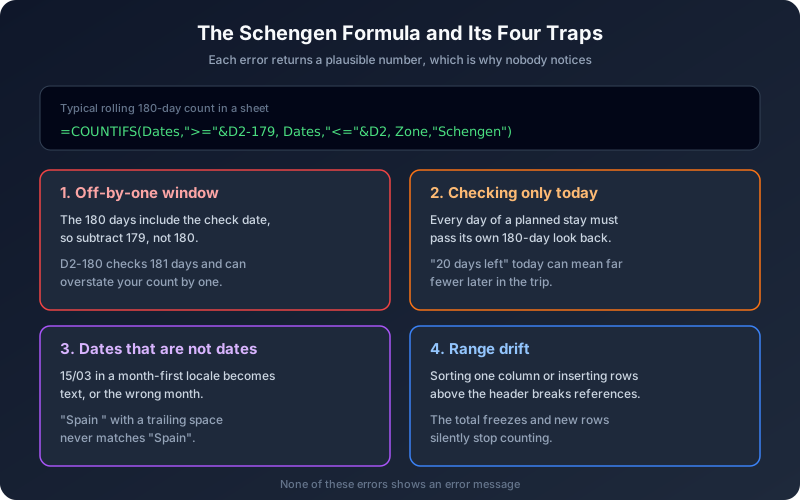
=COUNTIFS(Dates, ">=" & D2 - 179, Dates, "<=" & D2, Zone, "Schengen")
Count every Schengen row in the 180 days ending on the date in D2. Simple enough. Here is what goes wrong with it in practice:
The off-by-one window
The 180-day period includes the day you are checking. That is why the formula subtracts 179, not 180. Write D2 - 180 and you are silently checking a 181-day window, which overstates your count by up to one day. Swap the comparison operators to strict > and < and you lose a day on each side instead. Either error is invisible: the number looks plausible, it is just wrong.
Checking the wrong day
The 90/180 rule is not "how many days have I used as of today". Under the Schengen Borders Code, every single day of a planned stay must satisfy the rule when you look back 180 days from that day. A sheet that only computes today's number will tell you that you have 20 days left, when in reality some of those 20 future days fall in windows that are already full. To check a planned trip properly, you need the formula evaluated for every future date of the trip, and you need the future rows to exist in the sheet before you travel.
Rows that are not really dates
Type "15/03/2026" into a sheet whose locale expects month first and you either get a text string that COUNTIFS skips, or worse, 3 March of a different month order that it happily counts in the wrong place. Paste data from a booking email and you may get trailing spaces in the country column, so "Spain " no longer matches "Spain". The total drops, and nothing tells you why.
Range drift
Named ranges and absolute references hold up well until someone inserts rows above the header, sorts only one column, or copies the formula down a column where the reference was relative. A single broken reference can freeze a total for months. When a sheet's total and its raw rows disagree, the usual culprit is a formula that stopped covering the newest rows.
Failure Point 2: Time Zones and the Overnight Flight
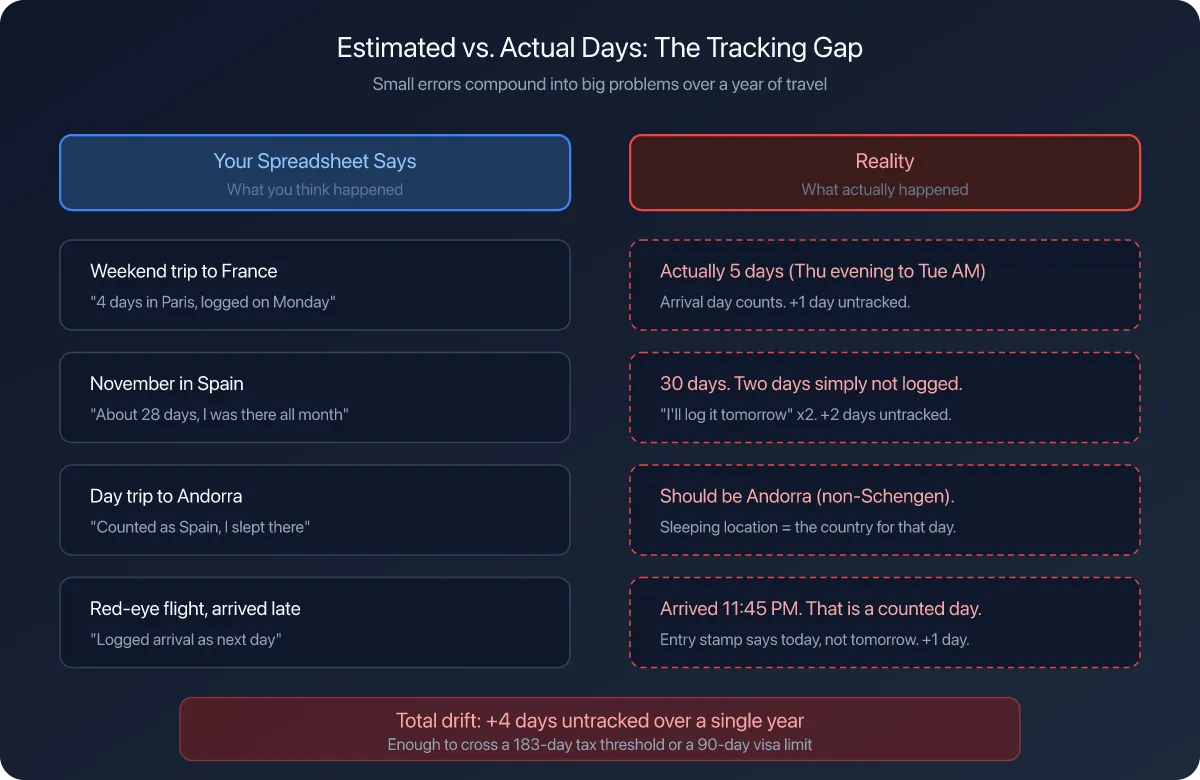
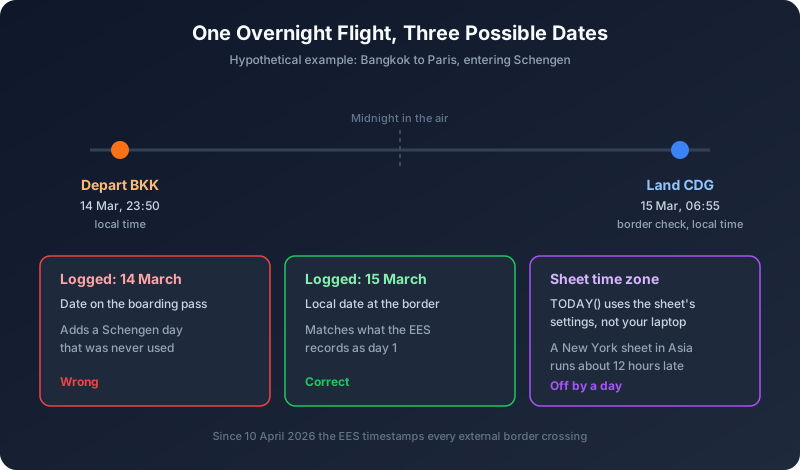
Imagine a reader we will call Daniel, a Canadian freelancer heading from Bangkok to Paris. His flight leaves at 23:50 local time on 14 March and lands at Charles de Gaulle at 06:55 on 15 March.
Which date does he type into his sheet? People reasonably pick any of three:
- 14 March, the date on the boarding pass and the date he "left".
- 15 March, the local date at the Schengen border.
- Whatever date the spreadsheet itself thinks it is.
Only the second one is right for Schengen. The border system records the crossing in local time at the border, so 15 March is day one of his stay. If Daniel logs 14 March, his sheet shows one more Schengen day than he actually used. If he logs his exit at the end of the trip the same way, using the departure date of a flight that crosses midnight, he can be a day short instead, and a day short is the dangerous direction.
The third option sounds silly until you meet it. In Google Sheets, functions like TODAY() and NOW() use the time zone set in the spreadsheet's own settings (File, then Settings, then the General tab), not the time zone of the laptop you happen to have open in Bangkok. A sheet created in New York and never changed will roll over to the next day roughly half a day after you do in Asia. Any "days remaining" figure built on TODAY() is then off by a day for half of every day you spend there.
Since 10 April 2026, when the EU's Entry/Exit System became fully operational, these dates are no longer a matter of opinion. The EES replaced passport stamps for non-EU travellers at the external borders of 29 countries, and it records every crossing with biometric data and an exact timestamp. Your spreadsheet now competes with a government database that does not make off-by-one errors. Our ETIAS and EES update covers what that system checks and when.
Failure Point 3: The Lookup List Nobody Updates
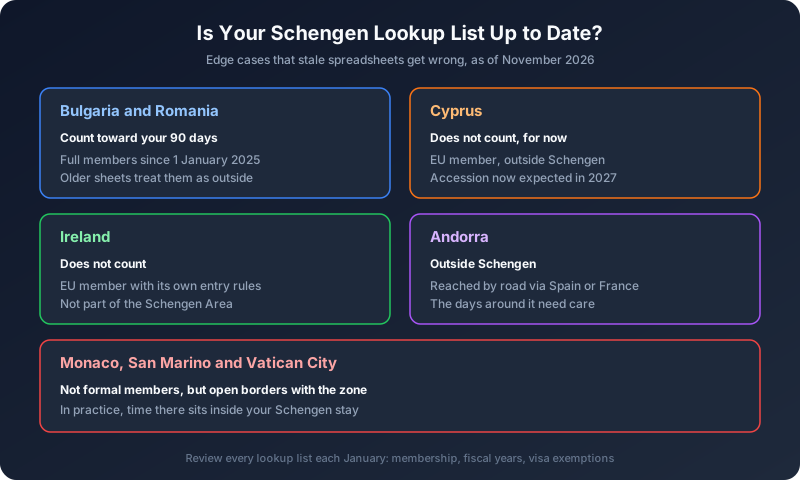
To count Schengen days, your sheet needs to know which countries are Schengen. Most people solve this with a small lookup table or, more often, by typing "Schengen" next to the country by hand. Both go stale, because the membership keeps moving:
- Bulgaria and Romania became full Schengen members on 1 January 2025, when land border checks were lifted. Sheets set up before then often still treat them as outside the zone, which makes a Sofia or Bucharest stint look like "free" days. It is not.
- Cyprus is an EU member but not yet in Schengen. Its government targeted 2026, but in October 2026 the deputy migration minister said accession is now expected during 2027, and the decision needs unanimous approval in the EU Council. Days in Cyprus do not count toward the 90 today. That will change, and your sheet will not know.
- Ireland is in the EU and outside Schengen, with its own separate rules.
- Andorra is outside Schengen, but you can only reach it by road through Spain or France, so the days around it need careful handling.
- Monaco, San Marino and Vatican City are not formal members, but they have open borders with the zone, so in practice time there sits inside your Schengen stay.
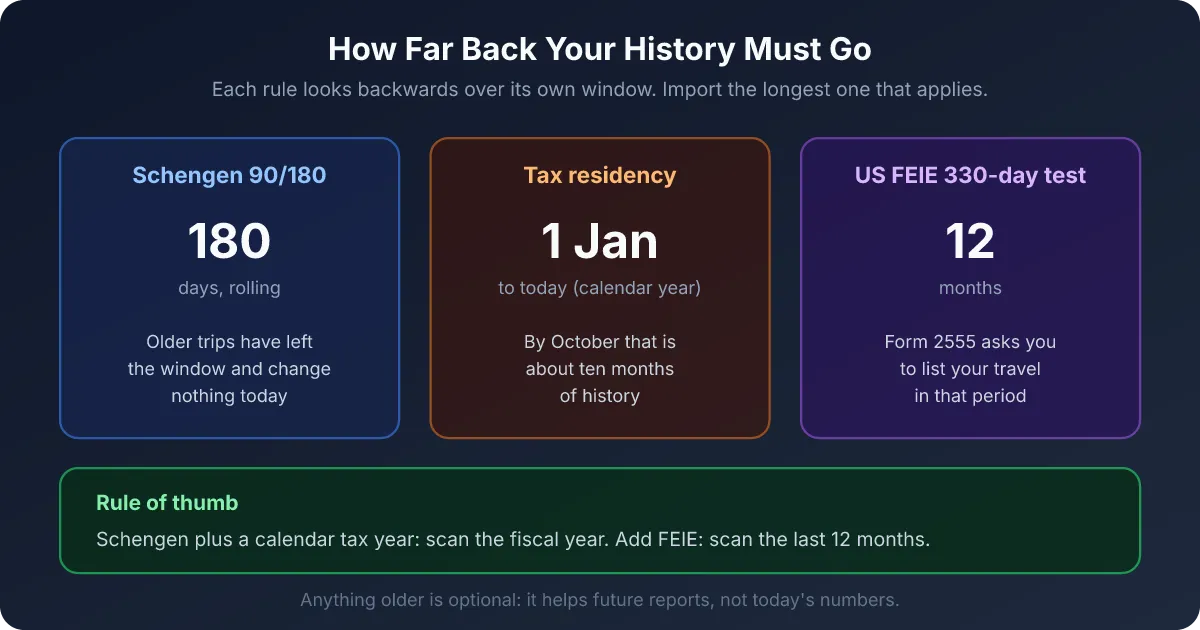
Then repeat that exercise for every other list your sheet depends on: which countries use a calendar tax year and which use a different fiscal year (the UK runs from 6 April, Australia from 1 July), which visa exemptions changed this year, and which countries count entries rather than days. Each list is a small maintenance job, and each one fails silently when you forget it. Our guide to Schengen, EU and EEA differences has the full membership picture.
Failure Point 4: Proving It Later
A spreadsheet answers "how many days?". An audit asks a different question: "how do you know?".
When a tax authority questions your residency, a self-typed list of dates carries very little weight. What carries weight is evidence: boarding passes, accommodation invoices, card payments, phone location history. Spain is a good example of how the burden shifts. If the Agencia Tributaria counts your sporadic absences as Spanish days, it is on you to prove you were tax resident somewhere else, and that takes a certificate from the other country's tax authority, not a spreadsheet tab. Our deep dive on the Spanish 183-day rule walks through how that plays out.
The practical problem is that evidence is collected at the moment it exists. A boarding pass is in your inbox the week you fly. Three years later, when a letter arrives, half of it is gone. A spreadsheet has nowhere natural to keep it, so most people never do.
What Automated Tracking Changes (And What It Does Not)
We will be straightforward about our own product here, including its limits.
What Nomad Tracker does differently:
- It records location, not dates you remember. GPS notices when you change country and logs the day on your phone, even offline. Your manual edits always override the automation, so you stay in charge of the record.
- A crossing day can belong to two countries. A single day can hold both sides of a border crossing, so the Schengen counter and a country's tax counter can each read it the way their own rule requires.
- The rules live in the app, not in your formulas. The Schengen counter checks the full rolling window, the FEIE counter only credits full days abroad, and fiscal year boundaries are set per country. Ghost Trips let you test a planned itinerary against your future limits before you book anything.
- Proof attaches to the day. You can attach a photo of a boarding pass or an invoice to the day it was taken, and later export a PDF report for an adviser or a CSV to check in your own spreadsheet.
What it does not do: it does not decide your tax residency for you. Ties, centre of interests and treaty tie-breaker rules need a human, ideally a qualified adviser. GPS can also miss days if location permissions are switched off, which is why the app flags days with missing data instead of guessing them.
When a Spreadsheet Is Still Enough
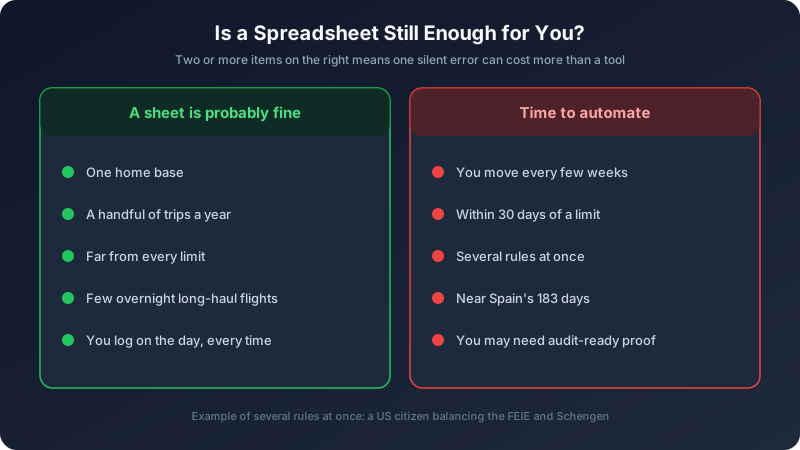
Honestly, for a lot of people it is. A sheet is probably fine if:
- you have one home base and take a handful of trips a year,
- you are nowhere near any threshold (say under 60 Schengen days and well under 183 days anywhere but home),
- you rarely take overnight flights across many time zones,
- and you are disciplined enough to log on the day, every time.
It stops being enough when two or more of these apply: you move every few weeks, you are within 30 days of a limit, you need to satisfy several rules at once (a US citizen balancing the FEIE and Schengen, or anyone near Spain's 183 days), or you would need to defend your numbers to a tax authority. That is the point where the cost of one silent error is larger than the cost of a tool.
The Bottom Line
Spreadsheets do not fail loudly. They fail by being one day off in a cell nobody checks, with a formula that stopped covering new rows, using a country list from 2024, in a time zone you set up years ago. Each error is small. Together, near a 90-day or 183-day line, they are exactly the margin that matters.
If you keep a sheet, keep it honest: subtract 179, check every future day of a trip, log the local date at the border, review your lookup lists every January, and save your evidence as you go. If that sounds like a second job, that is the job we built Nomad Tracker to do for you.
Retire the spreadsheet, keep the control.
Nomad Tracker logs your days by GPS, counts Schengen 90/180, the 183-day rule and the FEIE with each rule's own definition of a day, and lets you test future trips with Ghost Trips. All on-device, all private. Available on iOS.
Download on the App Store