What you’ll achieve
By the end of this guide you can prove the FEIE number rather than believe it: which days the app counted, why they count, and whether your history supports the total.
This matters more here than on any other counter. The physical-presence test is decided by a day count, and every day the app does not know about makes your position look better than it is.
Enable the FEIE day tracker covers turning it on and reading the card. This guide is the audit.
Step 1: Read the window, not just the number
Open the Dashboard tab and tap the US Tax Exclusion card.
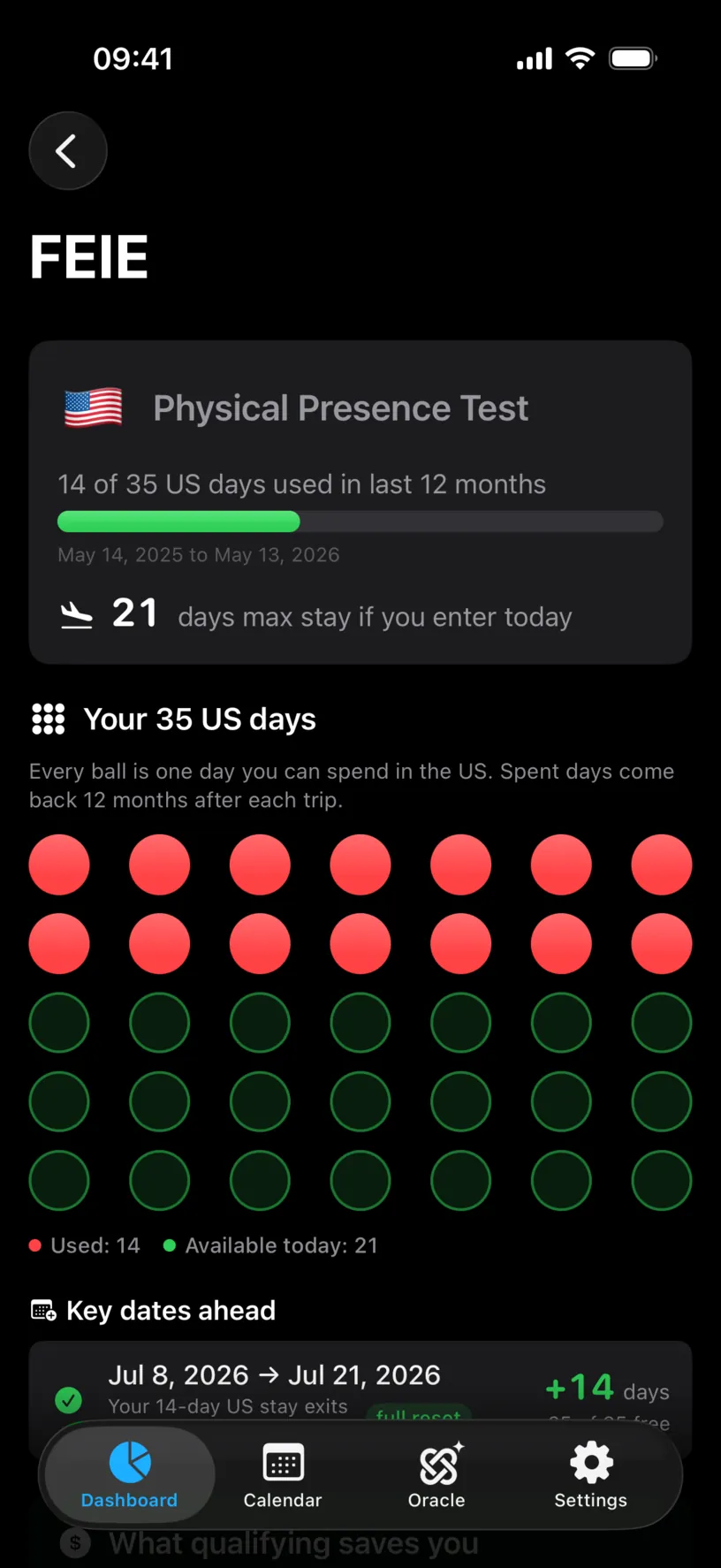
14 of 35 US days used in last 12 months is the count. The line under the bar is the audit boundary: May 14, 2025 to May 13, 2026.
Those dates are the whole scope of the number. A US day on 13 May 2025 is not in this count, and it is not an error that it is missing: the window is the twelve months ending today, and it moves forward every night.
Write the start date down. Everything below is checked against it.
Step 2: Know what the app treats as a US day
Three rules decide the count, and none of them are printed on the screen.
A day counts if any log for it includes the United States. A day you logged in two countries, an arrival or a departure, counts as a full US day for this test. Days are not split.
Only days inside the window count. A trip that has scrolled out of the twelve months is gone from this number, though it stays in your history and in the explorer’s other windows.
Days after today do not count yet. A planned US trip, or a ghost trip, sits outside the used total until the dates arrive.
Together they explain most surprises. A count that looks too low is usually a missing log; a count that dropped on its own is usually a day that aged out.
Step 3: Find the stay behind the count
Scroll to Key dates ahead.
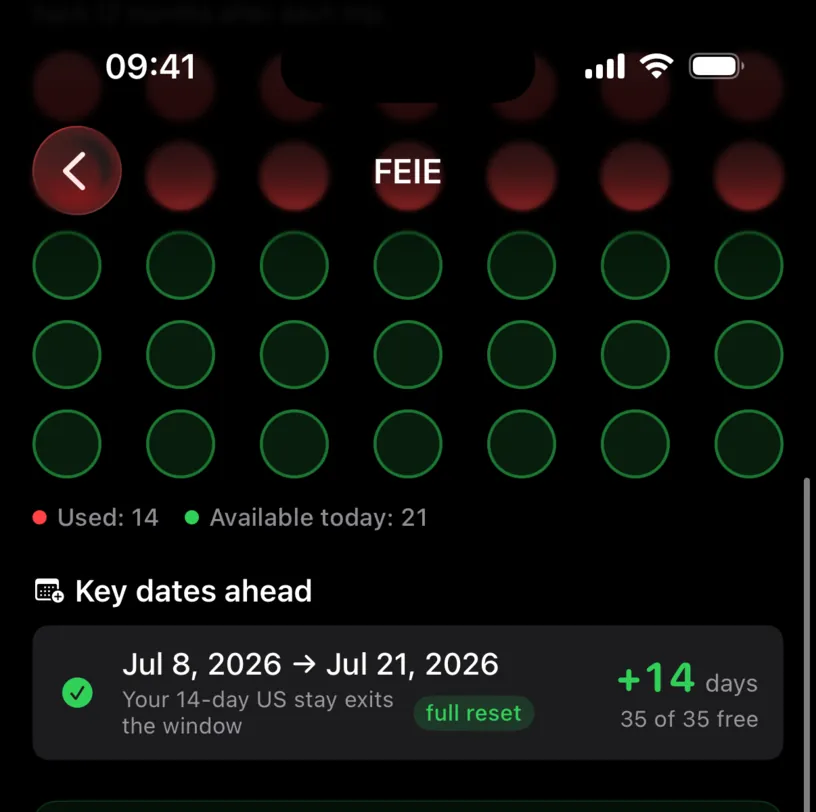
This section is built to answer a planning question, and it answers an auditing one as a side effect. Your 14-day US stay exits the window names the stay the count came from and its size, and the dates on the left are twelve months after the stay itself.
Read it backwards. A 14-day stay leaving the window on Jul 8, 2026 was a 14-day stay starting on 8 July 2025. That is the trip to go and check.
A count made of several trips gets a row for each, and every row tells you the size of the stay behind it and the date it leaves the window.
Step 4: Cross-check it in the calendar
Open the Calendar tab and go to the month you just worked out.
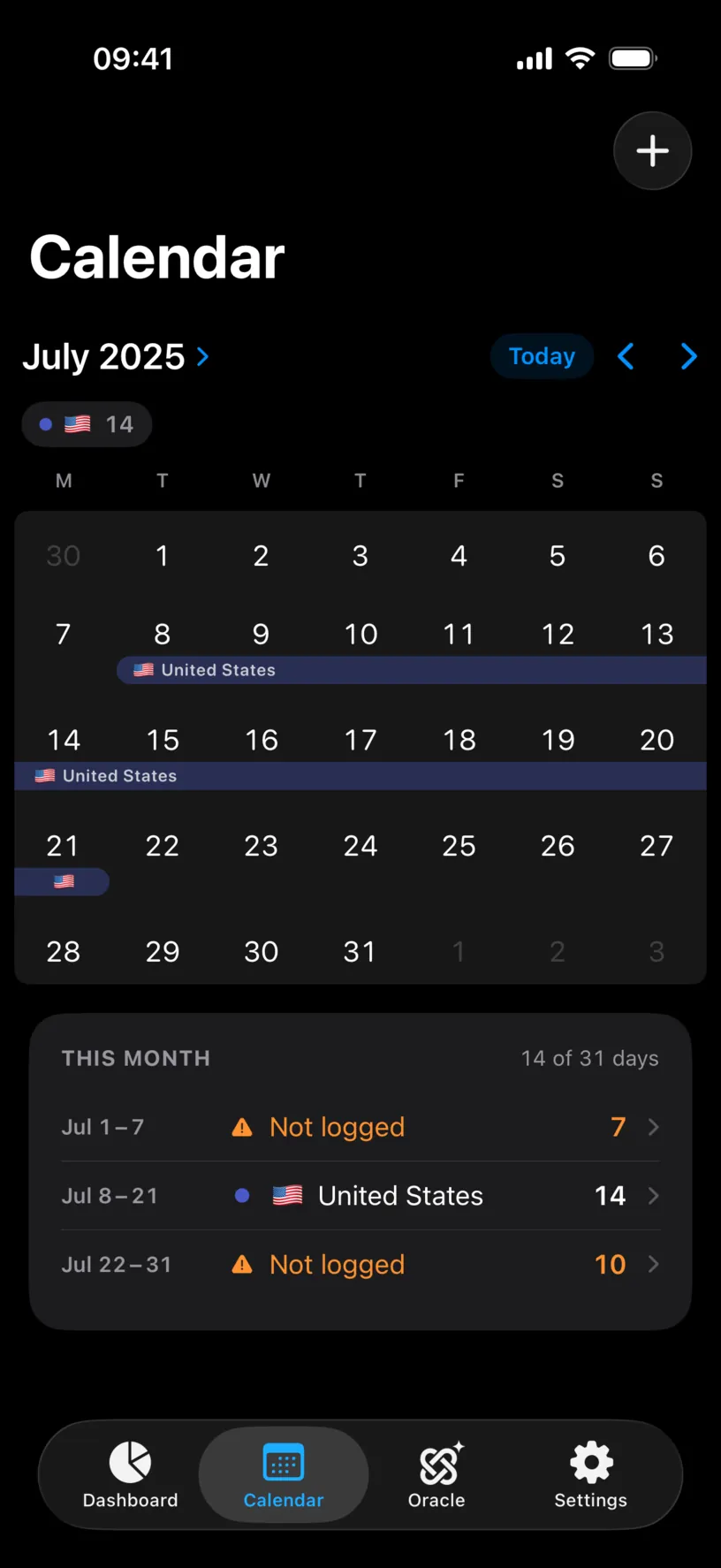
THIS MONTH gives you the number to compare: Jul 8 – 21, United States, 14. That matches the 14 on the counter, so this count is fully explained by one trip.
The orange rows matter as much as the blue one. Jul 1 – 7 and Jul 22 – 31 are Not logged, twelve unaccounted days sitting either side of a US trip. If any of them were also spent in the US, the counter is under-reporting and the ball grid is showing you green days you do not have.
That is the failure this guide exists to catch. Unlogged days do not count against you here, which is exactly why they are dangerous.
Check your result
Walk the months from your window start to today and add up every row that names the United States. The total should equal the used number on the card.
When it does, you know what the count is made of. When it does not, the difference is either a month you have not logged or a day logged in the US inside a stay you filed under another country.
Fix the history rather than the count. Find and fill missing days closes the gaps, and the counter recalculates as soon as the days exist.
If something looks different
The count is lower than you know it should be. Unlogged days. Check every month inside the window for orange Not logged rows, starting with the months around a US trip.
The count is higher than you expected. Look for a trip recorded a day long at each end. Both the arrival and the departure day carry a log, and both are full US days here.
A US trip you remember is not in the count. It has left the twelve-month window. The Which 12 months you file explorer at the bottom of the screen is where older trips still show up, and it is a PRO feature.
The count went down and you did nothing. The window moved. Days age out twelve months after the trip that spent them, and Key dates ahead is where the app announces the next one.
All 35 balls are green. No US day is logged inside the window. That is either the truth or an empty history, and step 4 is how you tell which.
The window is not a calendar year. By design. The test uses any twelve consecutive months, and this card follows the twelve that end today.
A day is logged in the US and another country and you expected half a day. There is no half day. The test counts days of presence, and any US log makes the whole day a US day.
Next steps
Enable the FEIE day tracker covers the card, the ball grid and the window explorer in full.
Find and fill missing days is the repair for everything this audit uncovers.
Create a PDF travel report turns the checked history into something you can hand to whoever asked for it.