What you’ll achieve
By the end of this guide you know exactly where the app draws the line between one entry and the next, and you can check it yourself with a simulated trip before you travel.
Under an entry-based rule that line decides everything. The same ten days either stretch the stay you are on or open a fresh one, and a single day is enough to tip it.
The example uses Thailand, set to 180 days per entry and 9 entries a year. Your own allowance comes from your passport and visa, not from this page.
Step 1: Check the rule you are counting against
Open the Settings tab, tap Countries & Regions, and tap the country.
Under Visa & Immigration, Track Runway is on and Runway Configuration reads 180 days · Entry Based. If it shows another calculation type, the rest of this guide does not apply: set it up first with Set a country’s visa limit.
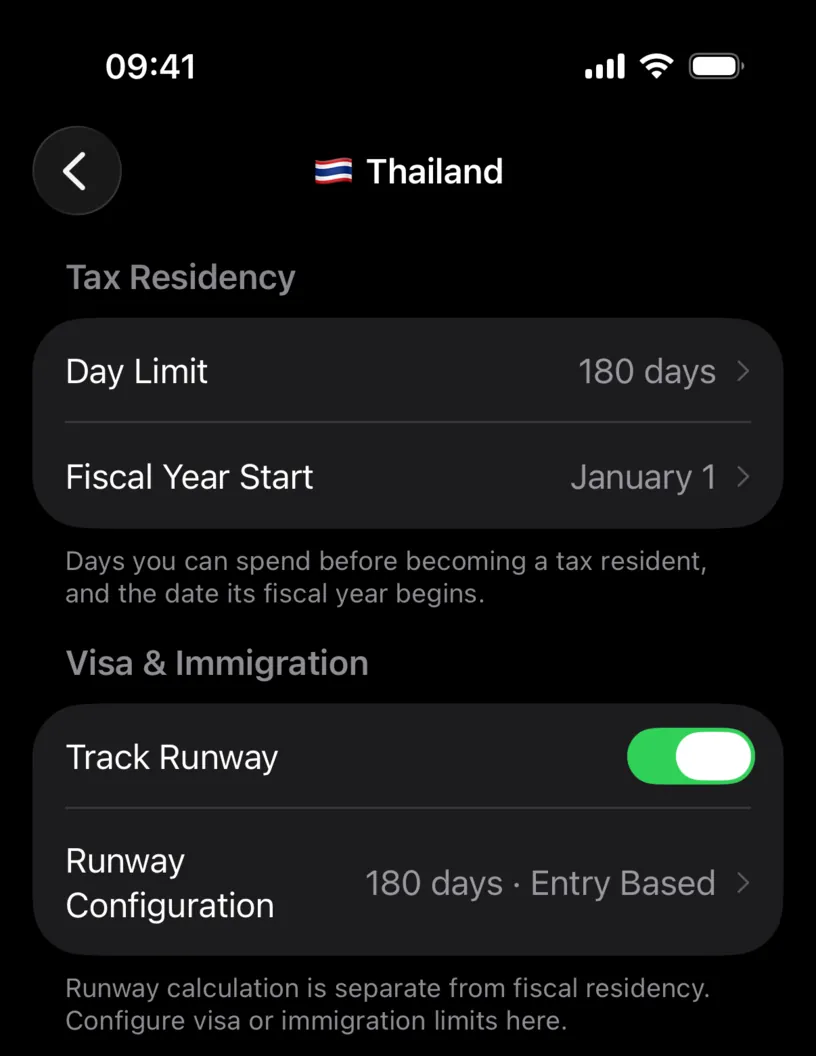
The footer is worth reading once: runway calculation is separate from fiscal residency. That separation is the point of the next steps.
Step 2: Find your entries in the calendar
The app has no list of entries. It works them out from your days, and the rule is simple: consecutive days in the country are one entry, and any day spent elsewhere or left empty ends it.
Open the Calendar tab and look at a month where you left and came back. In April 2026 this profile has Taiwan from April 1 to 20, Japan from April 21 to 24, and Thailand again from April 25.
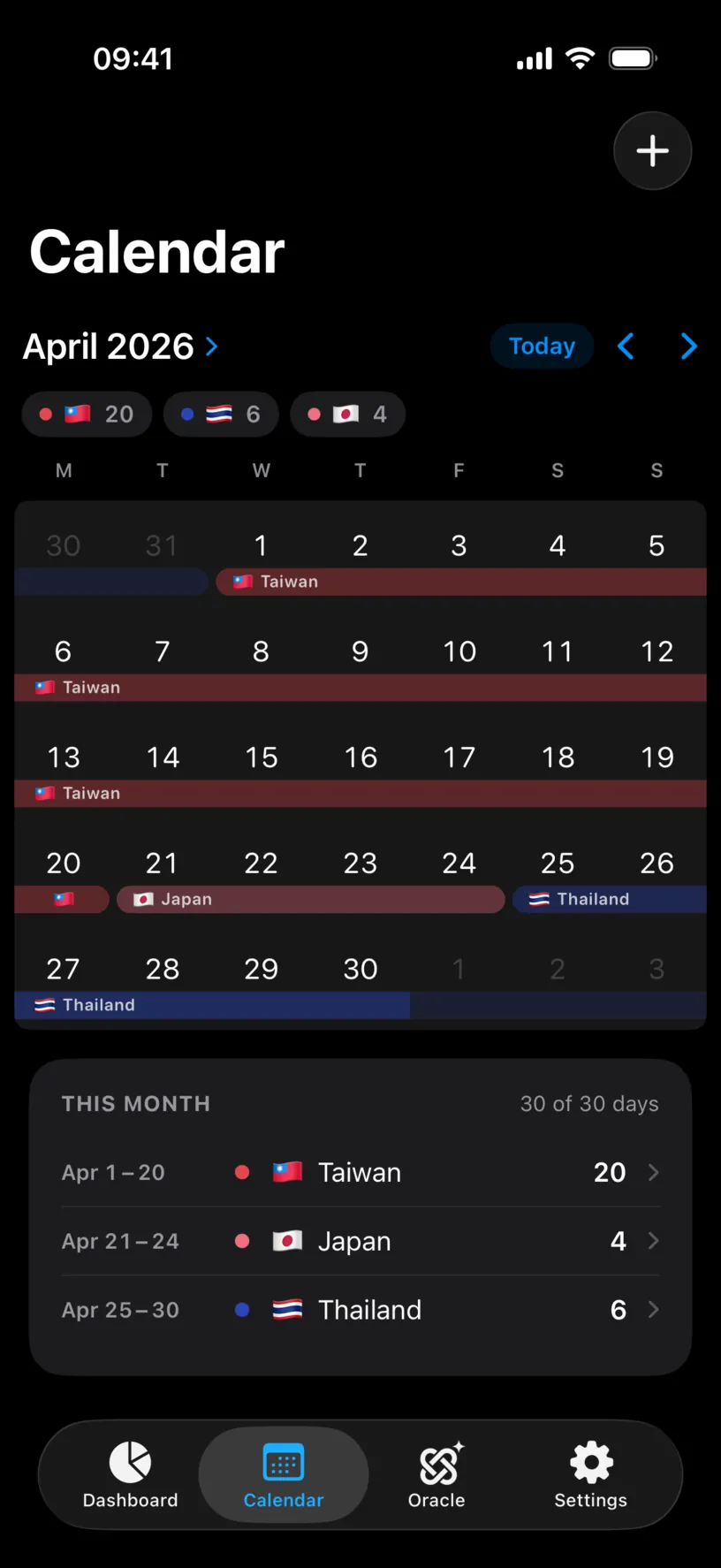
So Thailand has two entries this year: February 20 to March 31, and April 25 onwards. The weeks in Taiwan and Japan are what split them.
Step 3: Read the Entry Limit row
Open the Dashboard tab and scroll to Countries. The country’s card has two rows.
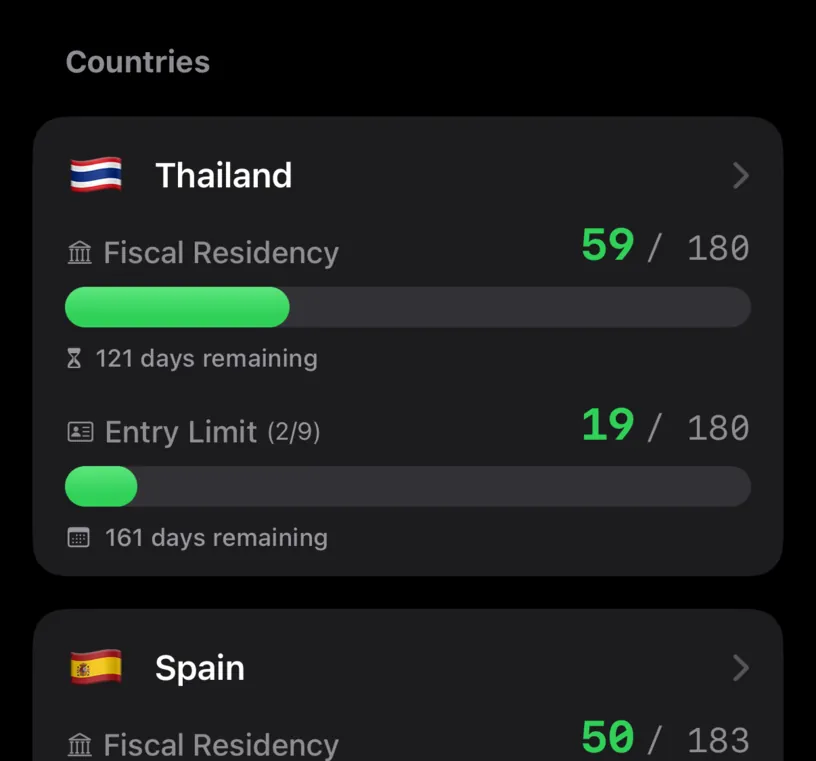
Entry Limit (2/9) says you are on your second of 9 entries this year. 19 / 180 counts only the days of the entry you are in today, April 25 to May 13, and 161 days remaining is what is left of it.
Fiscal Residency above it counts every day of the year in the country, both entries together: 59 / 180.
Step 4: Simulate a trip that continues the stay
To see the rule at work, add a ghost trip. Open the Calendar tab, tap Add, then Add Ghost Trip. Plan your first trip with Ghost Trips covers the sheet in detail.
Pick the day right after your last logged day, May 14, through May 23, keep the country on Thailand, and tap Add.
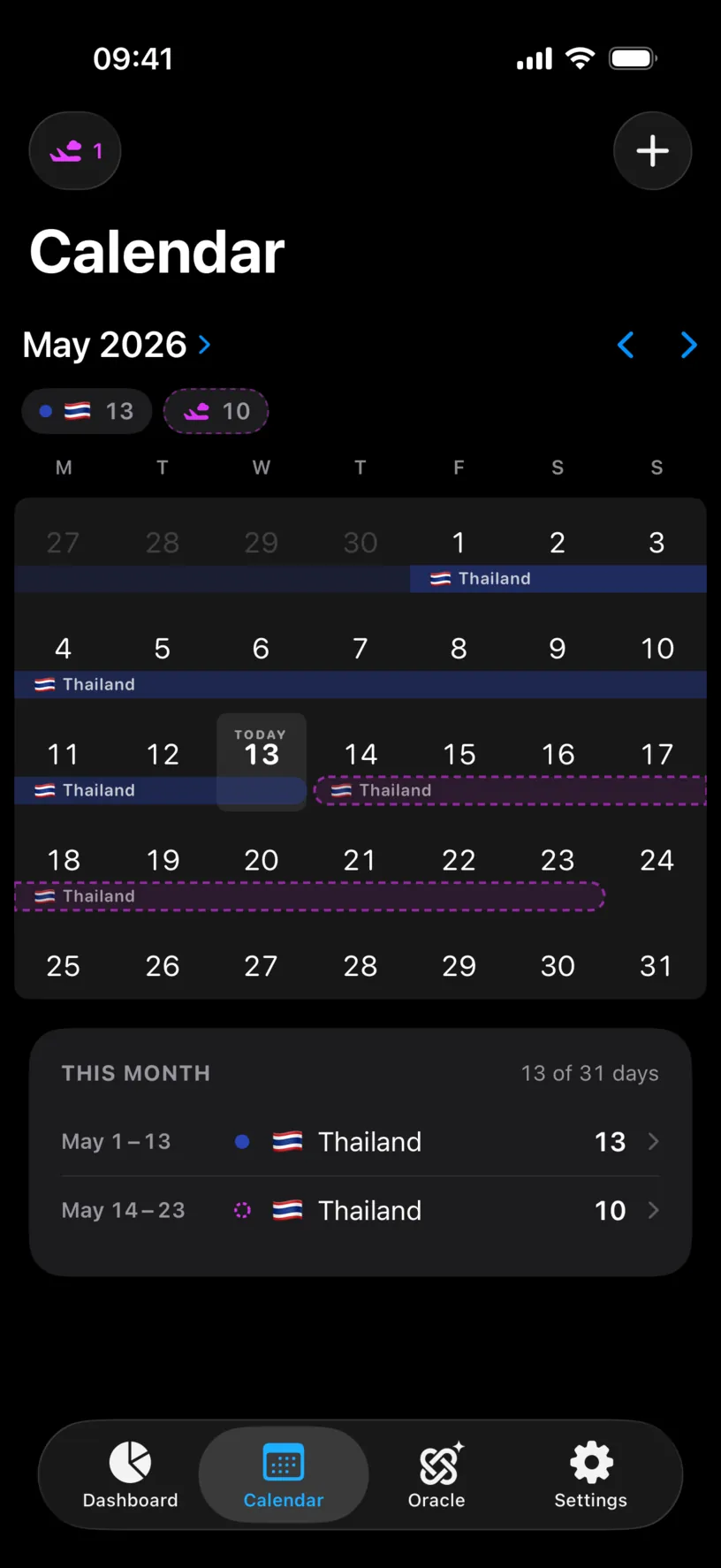
The dashed trip touches the logged stay, with no day in between.
Step 5: See the entry stretch
Back on the Dashboard, the Thailand card now reads:
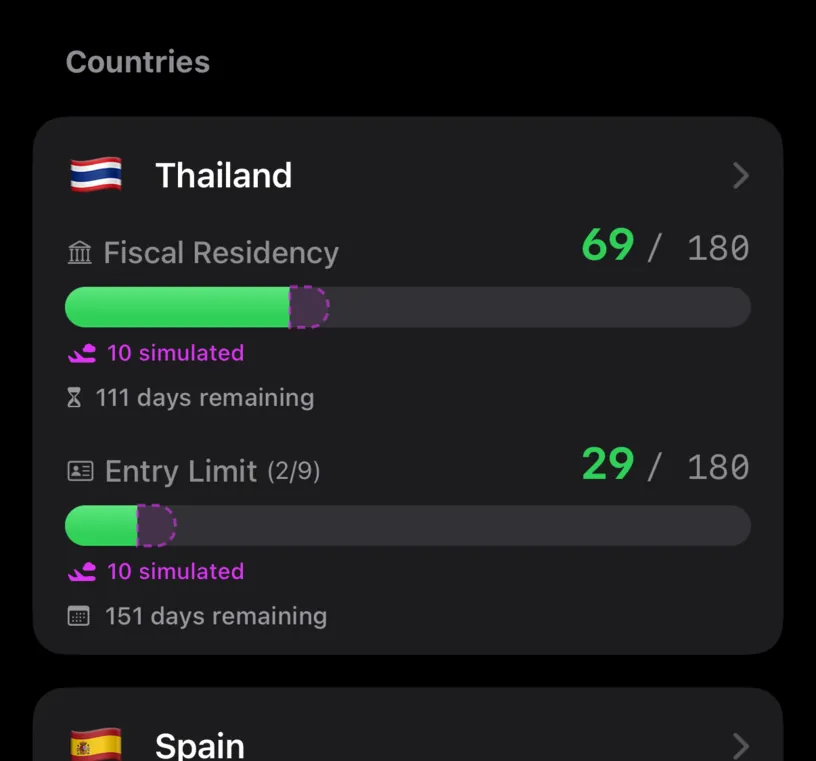
Entry Limit is still (2/9), and the entry grows from 19 to 29 / 180, with 10 simulated under it. The app treats the trip as the same stay carrying on, because nothing interrupts it.
Step 6: Move the trip by one day
Now clear it and try again one day later. Tap the plane chip in the top left of the Calendar tab, tap Clear All, then Done, and add a new ghost trip from May 15 to May 24.
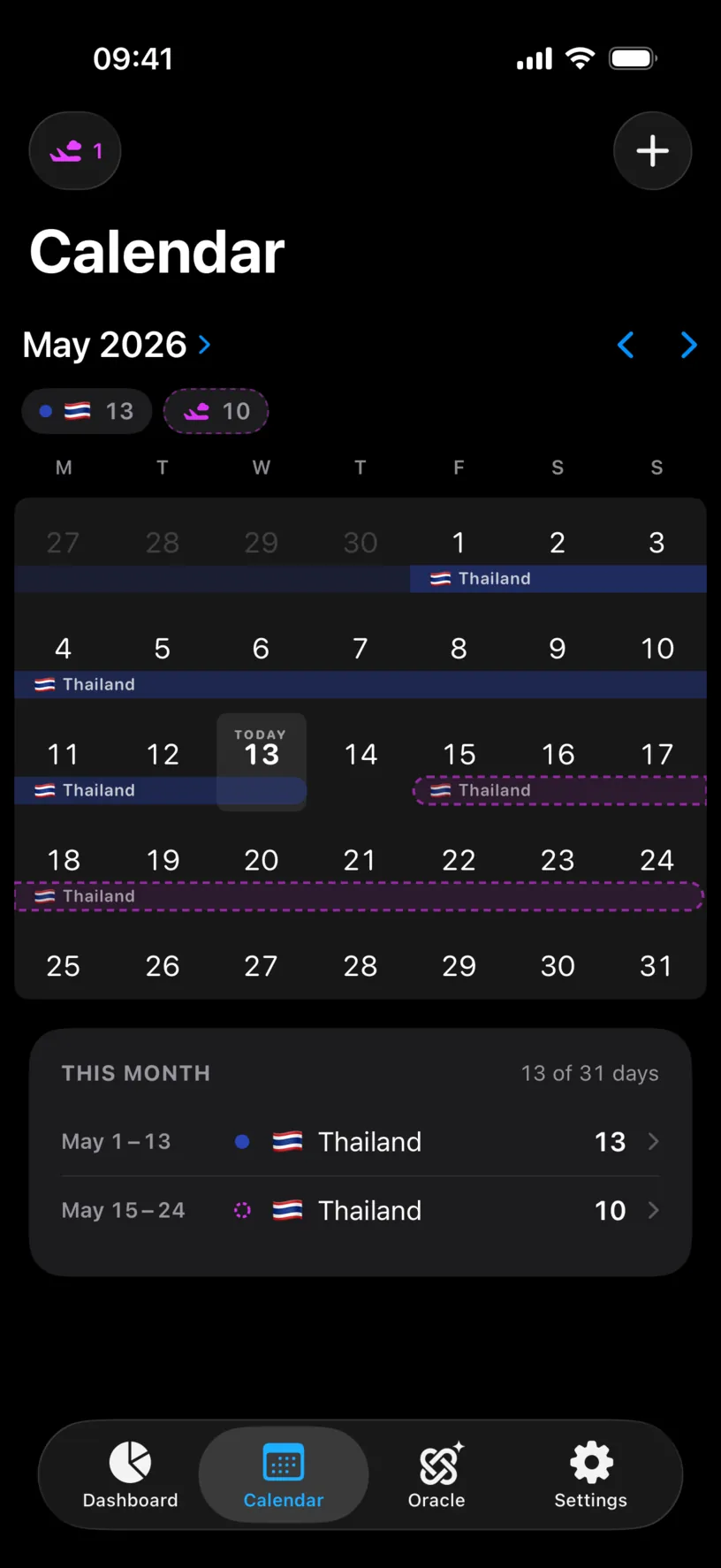
May 14 is now empty. That one day is the whole difference.
Step 7: See a new entry open
The dashboard card changes in a different way:
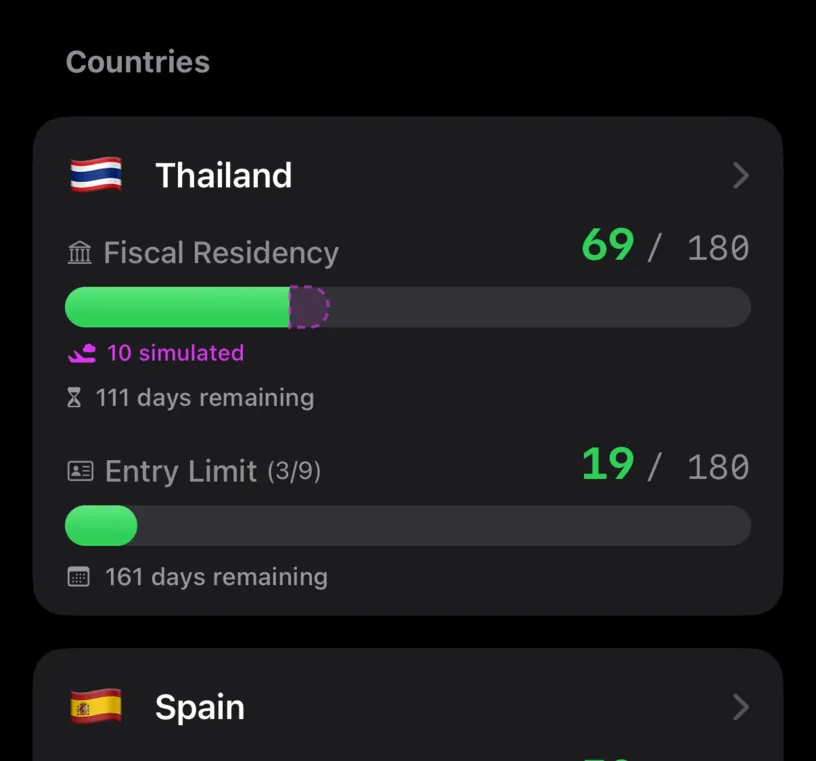
Entry Limit jumps to (3/9). The gap turned the trip into a new entry, so it uses up one of your 9 entries but starts with its own fresh 180 days. The row keeps measuring the entry you are in today, which is why it goes back to 19 / 180.
Fiscal Residency reads 69 in both steps. The tax counter adds up days and does not care how they are grouped. Only the entry counter does.
When you are done, open the plane chip again and tap Clear All. Ghost trips never touch your logged days, and they are gone anyway the next time the app starts.
Check your result
Compare step 5 and step 7. Same country, same ten days, and the same 69 on Fiscal Residency. On Entry Limit one reads (2/9) with a longer stay and the other (3/9) with a fresh one.
If you see both, you can predict how the app will count any trip: does it touch your last day in the country, or not?
If something looks different
A day you were in the country shows as a gap. An empty day ends an entry just like a day abroad does, so one forgotten day splits a single stay into two entries and uses up an extra one. Find and fill missing days shows where the empty days are.
A travel day counts as part of the stay. A day logged with two countries, the day you fly in, for example, still counts as a day in each of them, so it keeps the entry going. Record two countries on the same day explains how those days are counted.
The card has no Entry Limit row. Track Runway is off for that country, or its calculation type is not Entry Based. A country on another type shows Visa / Immigration instead.
The count in brackets is higher than the maximum. The number turns orange when you reach the limit and red when you pass it. The app only counts: it does not know whether a border officer would let you in again.
The count in brackets dropped in January. It only counts entries that begin in the current calendar year. A stay that started in December is not part of the new year’s count, even while you are still in it.
Next steps
Set a country’s visa limit covers the other three calculation types and when each one fits.
Compare different travel dates uses the same ghost trips to weigh two plans against each other before you book.