What you’ll achieve
By the end of this guide a trip you have not taken yet sits in the app as a simulation, and the app has told you in one sentence whether its dates are legal under the 90/180 rule.
Nomad Tracker calls these ghost trips. They never touch your logged history, and for a Schengen country they get something the other simulations do not: a verdict, calculated against the days you have already spent.
The example is a month in Italy in June, on top of a history that already holds 46 counted Schengen days.
Step 1: Sketch the trip
Open the Calendar tab, tap + and choose Add Ghost Trip. Tap the first day of the trip in the grid, then the last, and add the country under Location.
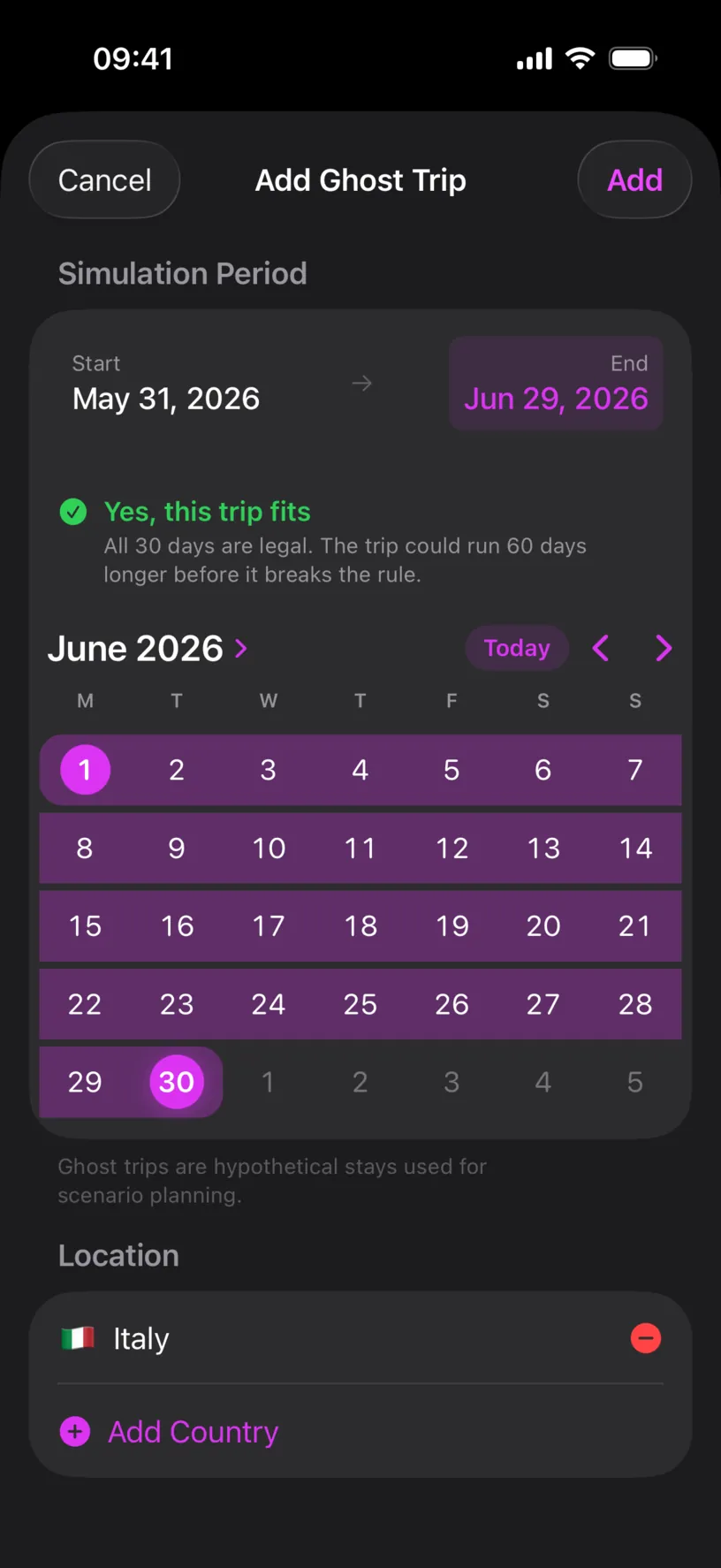
Read the grid, not the two boxes. START and END can print one day earlier than the day you tapped, while the highlighted range is what the app uses.
Plan your first trip with Ghost Trips covers this sheet in full. What follows is the part that only happens for a Schengen country.
Step 2: Read the verdict
The banner above the grid answers the question you came for, and it updates as you move the dates.
Yes, this trip fits is followed by the detail that matters: All 30 days are legal. The trip could run 60 days longer before it breaks the rule.
That second sentence is your margin. Thirty days plus sixty days is the ninety the rule allows, so the app is telling you how much room is left in the window this trip lands in, not just that today’s plan is fine.
The verdict counts your logged Schengen days, your exempt countries and this trip together. A trip that looks harmless in isolation can still fail, which is what step 6 shows.
Tap Add.
Step 3: Check what it did to your counter
Open the Dashboard tab.
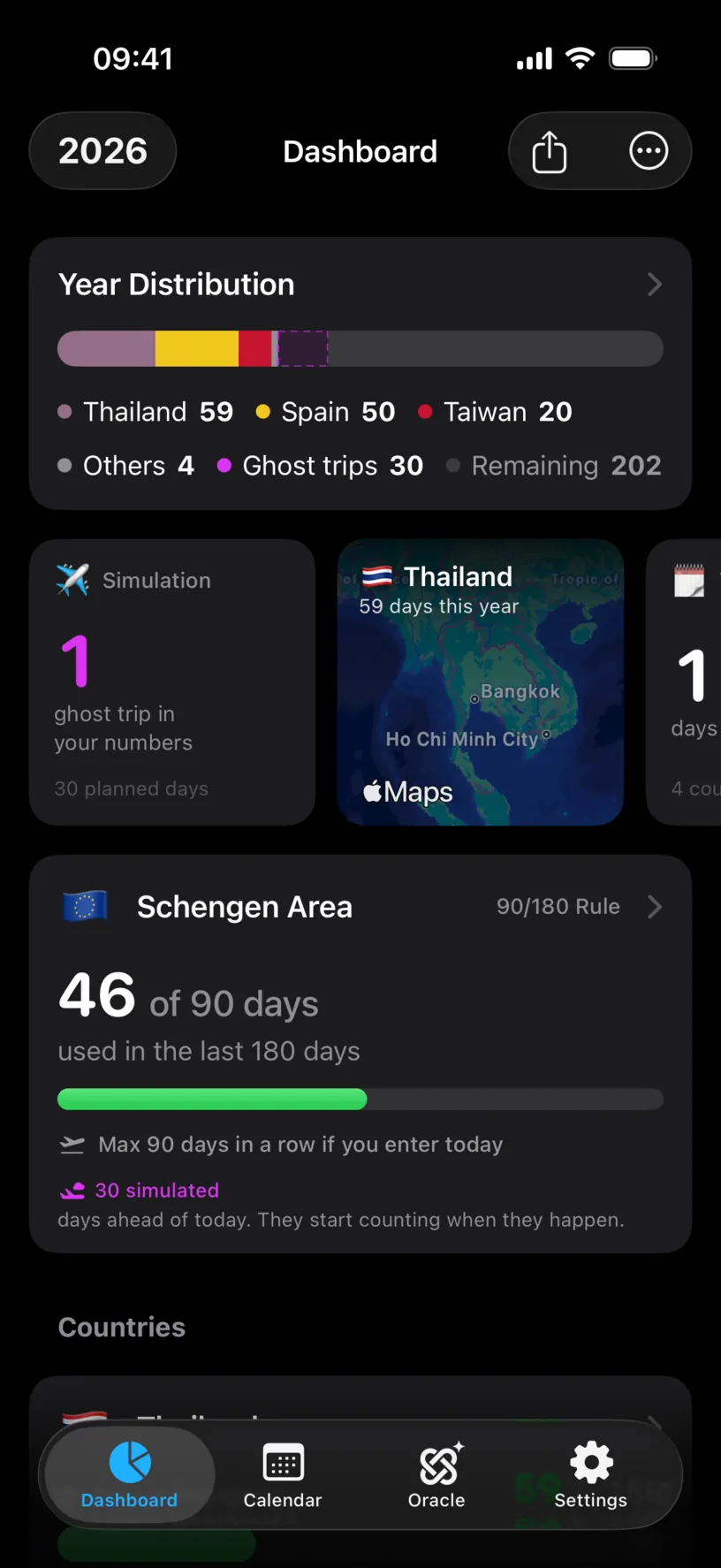
Three things changed, and one deliberately did not.
Year Distribution gained a Ghost trips entry of 30 days and dropped Remaining to 202. The widget strip gained a Simulation tile, reading 1 ghost trip in your numbers and 30 planned days.
The Schengen Area card still reads 46 of 90 days used in the last 180 days. It did not move, and the caption underneath says why: 30 simulated, days ahead of today. They start counting when they happen.
That is the rule to take away from this guide. Your used count measures the 180 days behind you. A June trip is not behind you, so it does not enter that number in May, no matter how certain the plan is. The simulation shows up as its own line instead.
Step 4: Find the trip in the counter
Tap the Schengen Area card and scroll to the list of stays.
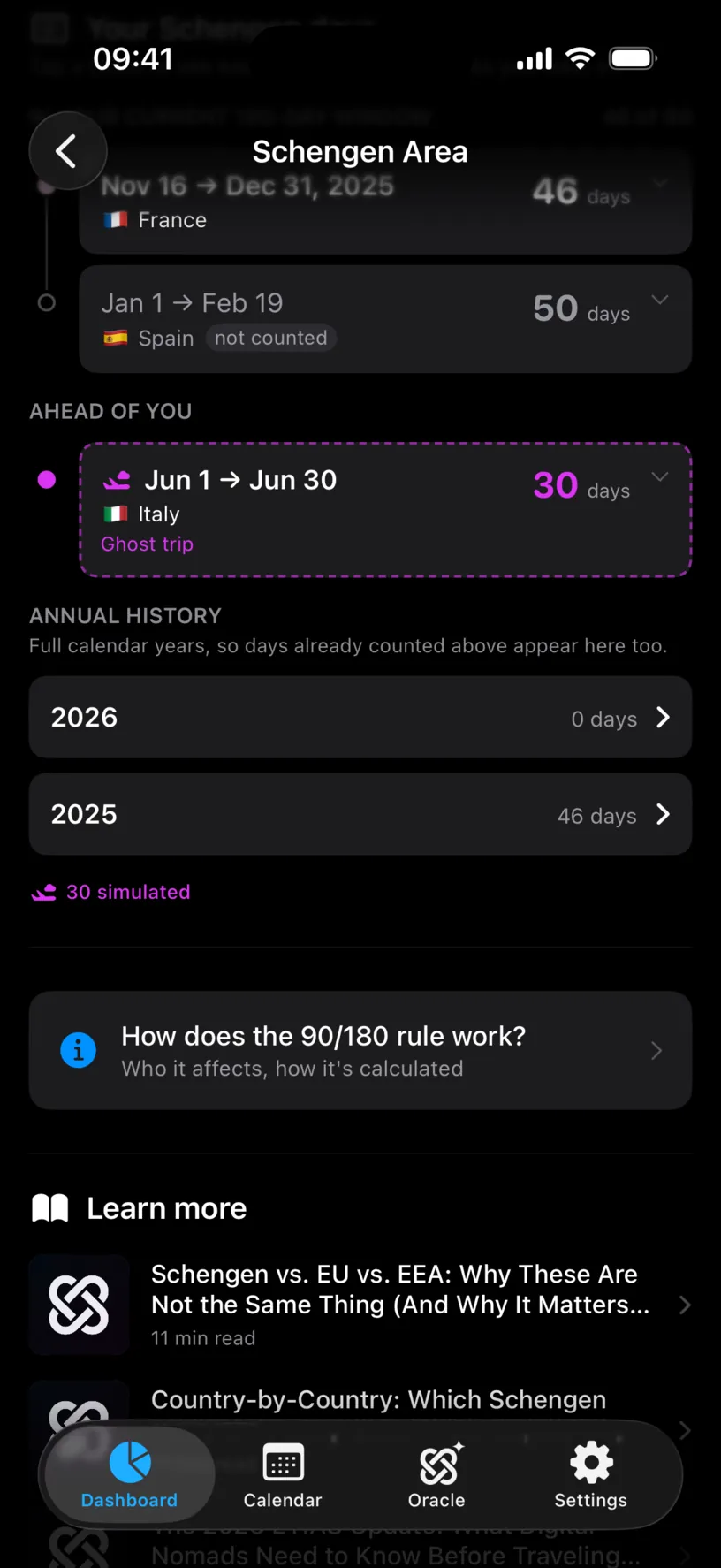
AHEAD OF YOU is a section that only exists while a simulation does. The trip sits there with a dashed outline and the label Ghost trip, below the stays that are actually counted.
Annual history is worth a second look. 2026 still reads 0 days, because no counted Schengen day has happened this year, and the 30 simulated caption sits under the list rather than inside the 2026 row. The app keeps the two apart everywhere it shows them.
Step 5: Pick the entry date with Plan ahead
Scroll up to Plan ahead and move to the month of your trip.
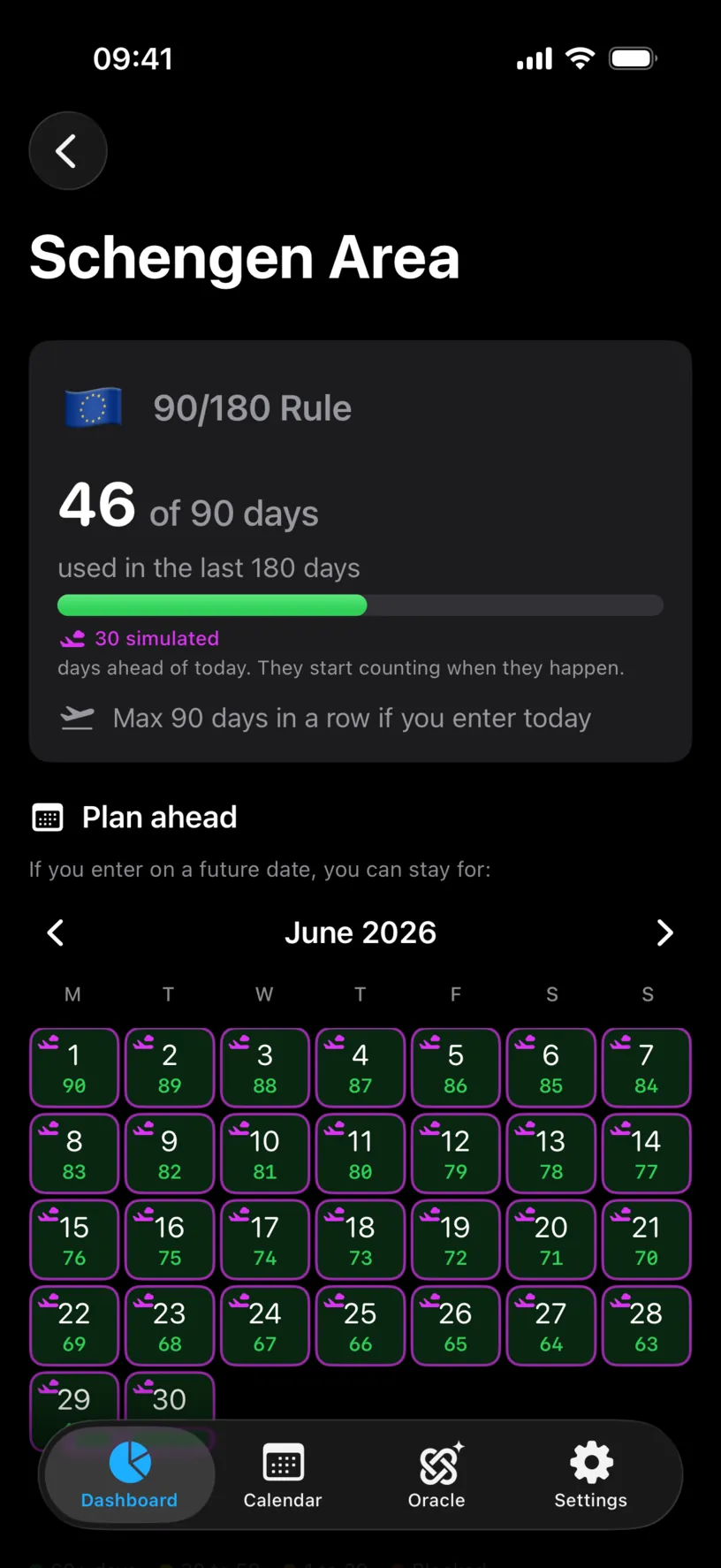
Every day of the trip now carries a plane marker, so you can see the simulation sitting inside the planner instead of having to remember its dates.
The green number under each date answers what it always answers: how long a stay starting that day could run. The numbers count down through the month, from 90 on the 1st to 61 on the 30th, because they all measure toward the same point where the ninety days run out. Read your Schengen day counter covers reading this grid in detail.
Plan ahead is a PRO feature. The verdict in step 2 and everything in steps 3 and 4 are not.
Check your result
Open the Calendar tab and tap the plane badge in the top bar.
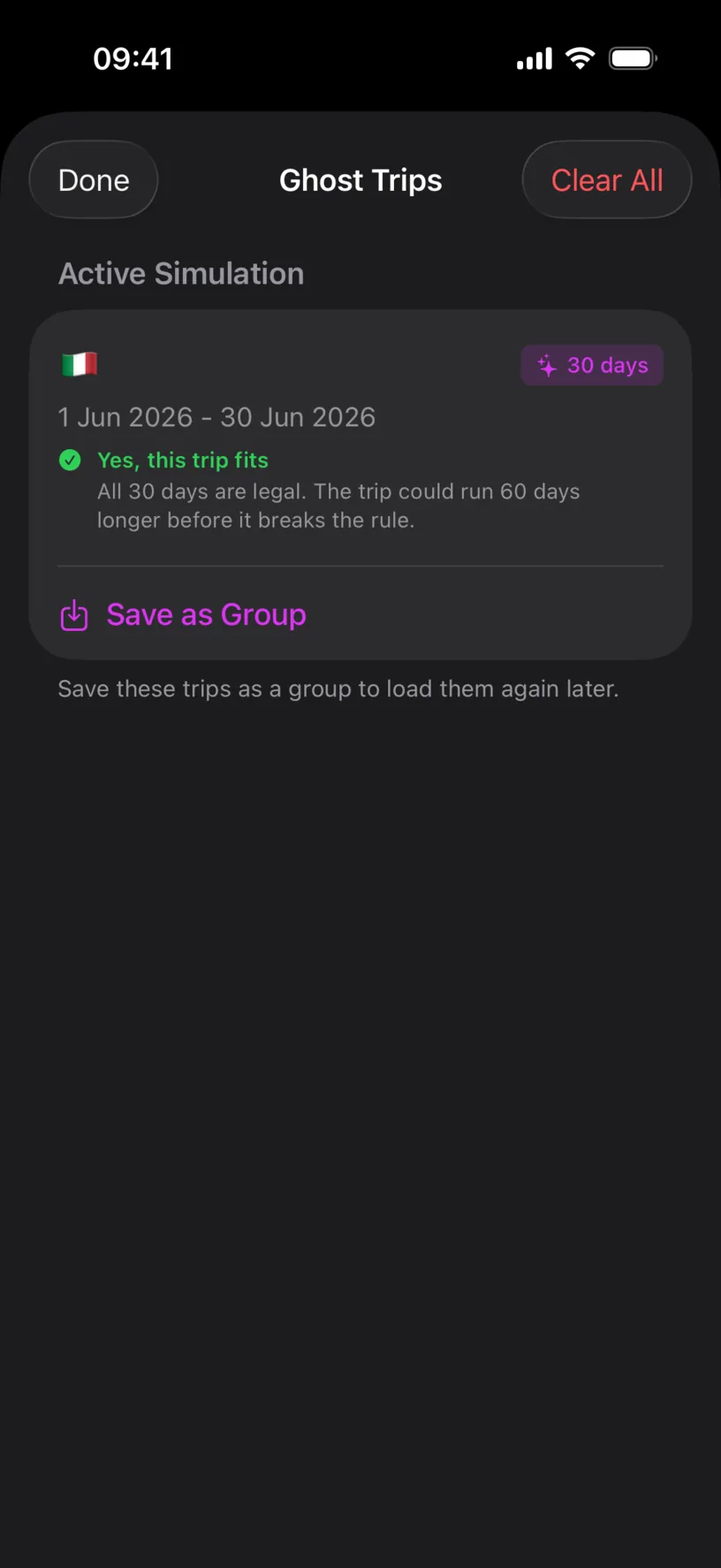
Active Simulation lists what the app is currently simulating: the flag, 30 days, the dates as 1 Jun 2026 - 30 Jun 2026, and the verdict again.
Use these dates to check the range, not the boxes in the creation sheet. This screen prints what was saved.
Save as Group stores the simulation under a name so you can load it again later, and it is a PRO feature.
If the trip does not fit
Stretch the same trip to the end of September and the banner changes colour.
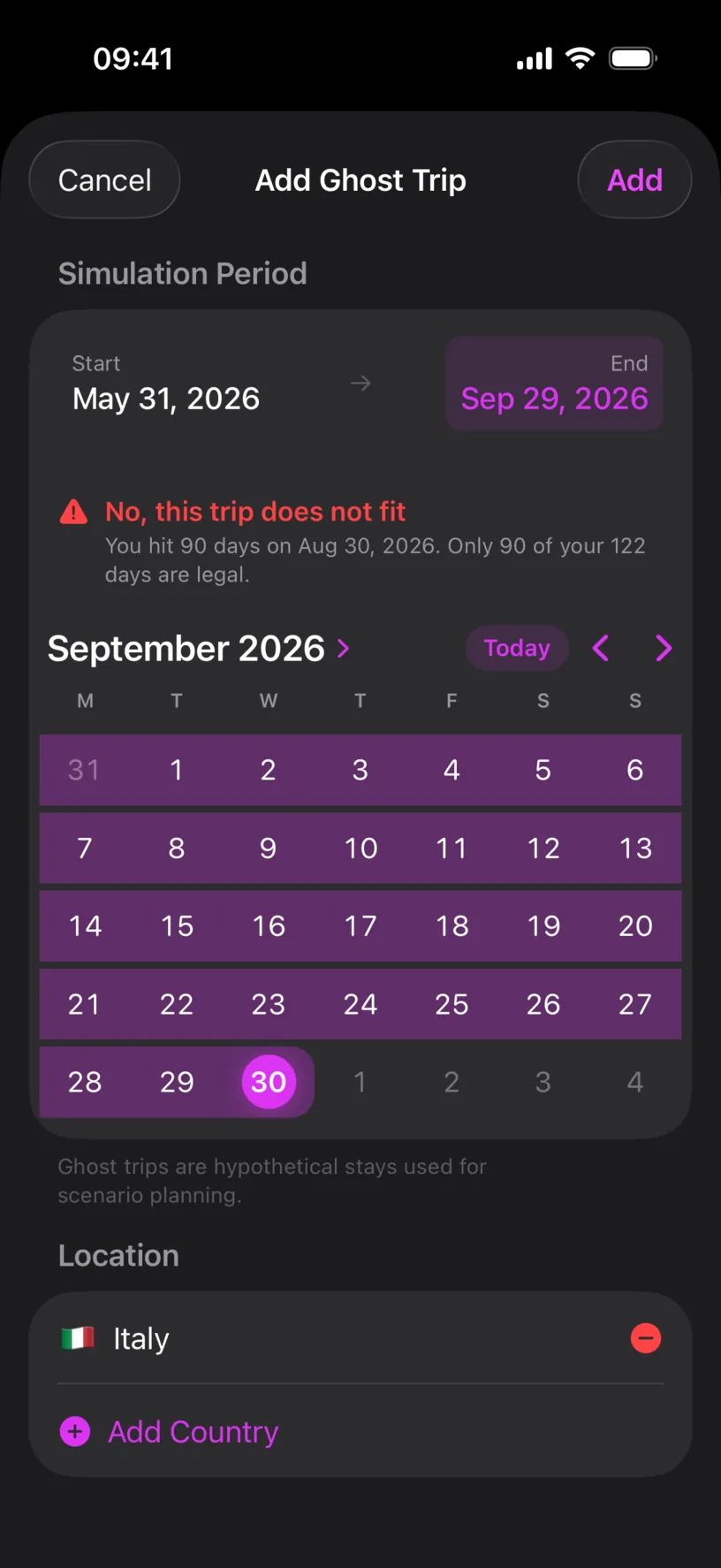
No, this trip does not fit comes with the two facts you need to redraw the plan: the date it crosses the line, Aug 30, 2026, and how much of it survives, Only 90 of your 122 days are legal.
This is the cheapest way to use the feature. Sketch the trip you want, read the date, and cut the trip back to it before anything is booked.
Clear the simulation when you are done
A simulation is session only. It disappears when the app restarts, and Clear All in the Ghost Trips sheet removes it immediately.
Leave it running while you are deciding. Clear it before you read your real counters, so no number on the dashboard carries a plan you did not take.
If something looks different
There is no verdict on the banner. The country is not in the Schengen Area, or the counter is off. Ghost trips work for any country; the verdict needs the 90/180 rule to be tracked, which Read your Schengen day counter turns on in step 1.
The verdict ignores a country you were in. Check your exempt list. A country you marked exempt is excluded from the count on purpose, which is what Configure a Schengen country exemption is for.
The used count did not change. Correct. Future days never enter the 180-day window, and the card says so under the number.
The used count did change. Part of your simulation is in the past. Days behind today count as days, simulated or not, so a ghost trip that starts before today mixes the two.
Plan ahead opens a paywall. The planner is PRO. The verdict and the counter are free.
The trip fits, then stops fitting a week later. Nothing broke. The window moves with the calendar, so a trip that fits in a window with room can stop fitting once real days land in front of it.
You want the trip to be real. Log it as a stay instead, or open the stay and turn the Ghost Trip switch off. Add and edit a stay in the calendar covers both directions.
Next steps
Read your Schengen day counter is the guide to the counter this trip was measured against.
Plan your first trip with Ghost Trips covers what a simulation does to every other counter, not just this one.
Set a country’s visa limit matters for the countries outside the Schengen Area, where the limit is the one you configured.